zchronos
How to translate?
#1 by zchronos - Oct 30 2013
Hi!I want translate LLTQ to Spanish. Can you help me?
- I know about Renpy and Python Programming.
My blog: Bishoujolinux
Linux user #460594
Linux user #460594

News, Walkthroughs, and Chat about Anime Games
#1 by zchronos - Oct 30 2013
Hi!
#2 by Spiky Caterpillar - Nov 1 2013
Hola! At the moment, we're busy prepping for a release, but once that's done I can probably help with translation. (We've got a framework for language-switching in Science Girls, I just need to make sure it plays nice with LLtQ and possibly add a couple of features.).#3 by zchronos - Nov 2 2013
Great! Thanks.#4 by Spiky Caterpillar - Nov 13 2013
I put an experimental patch that adds translation hooks up at http://spikycaterpillar.com/long_live_the_queen/translation/ .#5 by zchronos - Nov 13 2013
Thanks!. The patch works.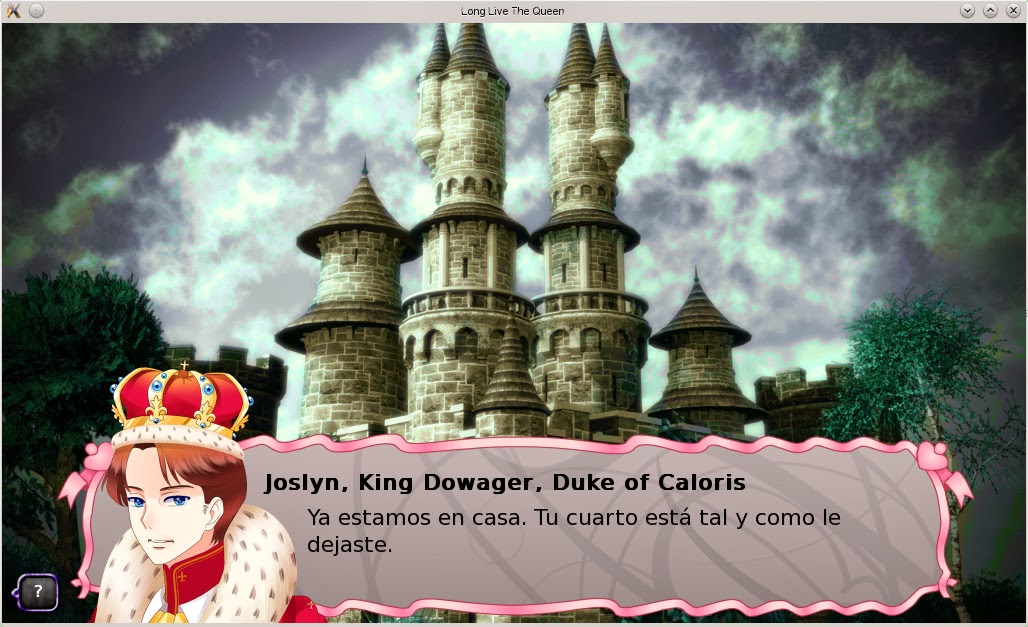
#6 by Spiky Caterpillar - Nov 13 2013
Translating the names works for me, though I did find some other bugs in the patch. (Fixed and uploaded)#7 by zchronos - Nov 13 2013
Nice, now I can translate the names and the game save the language.#8 by zchronos - Dec 23 2013
[UPDATE 2]#9 by Ohana - Dec 23 2013
I may be able to help out with getting the original English script lines dumped into a file, but I imagine it would be pretty effortless for spiky or someone else with scripting/coding skills and access to the original game scripts to run a few regular expressions that would dump all the text of the game into a single file that could act as a translation base.#!/usr/bin/env python
import os, codecs
#Single word renpy keywords that when detected will exclude the line in question
rpy_keywords = ["init","init:","layout","widget","widget_hover","widget_text","widget_selected","disabled","disabled_text","button_menu","rounded_window","mm_root","gm_root","(",")","python","python:","frame","image","define","label","scene","play","$","with","menu:","jump","show","hide","if","return","pos","anchor","def"]
#Words used to denote configuration settings. Any lines starting with one of these words will be excluded (more flexible matching pattern than the previous list...will conflict with character defines that start with a word in the list, so prefer the above list if possible)
rpy_configwords = ["config.","layout.","theme.","build.","(",")"]
#For some reason, renpy seems to work with utf-8 files with a BOM. It may be safe to use "utf-8" instead of "utf-8-sig"
outfile = codecs.open("tl_base", "w", "utf-8-sig")
#Checks if a line is actually a script text line. Unfortunately, if it is not a simple quoted line, we have to disqualify it from being anything else renpy uses internally before deciding if it is a character line. Parsing defines could work around this, but it would require making it into a two-pass process similar to how renpy itself reads the scripts when running an uncompiled game.
def isvalid(line):
if (line.strip().startswith("#") or line.strip().startswith("'")):
return False
elif line.strip().startswith('"'):
return True
elif len(line.strip()) == 0:
return False
else:
for word in rpy_configwords:
if line.strip().startswith(word):
return False
if not len(line.split("=")) > 0:
if not (line.strip().split()[0] in rpy_keywords):
return True
return False
#Removes quotes from the script line
def clean(input_line):
#work-around for escaped inline quotes
line = input_line.strip().replace(r'\"',"$quote$")
print(line)
if line.startswith('"'):
return line.strip('",:)')
else:
return ''.join(line.split('"')[1]).replace("$quote$",r'\"')
#Pushes the line out to out tl_base output file, followed by a blank line which should contain the translated text later
def writeout(cleanline):
outfile.write(cleanline)
outfile.write("\n\n")
outfile.flush()
#Iterates through an individual file and dumps its contents
def parsefile(file):
for line in file.readlines():
#Lazy error handling...should not come up often and I don't have a script handy that will trip this error. Should not come up at all when dumping English game scripts and this is a debugging feature rather than something that affects the output file
try:
print(line)
except:
print("---line contains characters that cannot be printed on the console---")
if isvalid(line):
writeout(clean(line))
#Main program. Finds all .rpy scripts in the folder and passes them on to be parsed by the other functions
for filename in os.listdir(os.getcwd()):
if filename.endswith(".rpy"):
print(filename)
#if you use an external editor to make your game scripts, they might not contain a BOM. Try changing "utf-8-sig" here to just "utf-8" or whatever codepage you have made your scripts in.
file = codecs.open(filename, "r", "utf-8-sig")
parsefile(file)
outfile.close()#10 by onigi - Jan 6 2014
Nice thread.
#11 by Ohana - Jan 6 2014
Just put your font file and an override rpy script like this into the "game" sub-folder to manually set the font and size for each style...(I think I got most of the styles used in the game added here but I may have missed some). I know there is a way to use an installed system font but I don't know of a good one you can assume everyone has for Japanese text support.onigi:
Nice thread.
I've started translate LLTQ to japanese and use the translatation support tools, but because the game doesn't have japanese-fonts, I can't check those texts on the game screen yet.
Would you please add the font to game?
Thanks.
init python:
    style.default.font = "meiryo.ttc"
    style.statstext.font = "meiryo.ttc"
    style.relportraitbox.font = "meiryo.ttc"
    style.relportraitframe.font = "meiryo.ttc"
    style.relportraitname.font = "meiryo.ttc"
    style.relfluffblock.font = "meiryo.ttc"
    style.relstat.font = "meiryo.ttc"
    style.relfluff.font = "meiryo.ttc"
    style.menu_choice_button.font = "meiryo.ttc"
    style.button_text.font = "meiryo.ttc"
    style.studyfluff.font = "meiryo.ttc"
    style.studybold.font = "meiryo.ttc"
    style.statsnum.font = "meiryo.ttc"
    style.selectablebutton.font = "meiryo.ttc"
    style.buttonwhite.font = "meiryo.ttc"

    style.default.size = 20
    style.statstext.size = 20
    style.relportraitbox.size = 20
    style.relportraitframe.size = 20
    style.relportraitname.size = 20
    style.relfluffblock.size = 20
    style.relstat.size = 20
    style.relfluff.size = 20
    style.menu_choice_button.size = 20
    style.button_text.size = 20
    style.studyfluff.size = 20
    style.studybold.size = 20
    style.statsnum.size = 20
    style.selectablebutton.size = 20
style.buttonwhite.size = 20#12 by onigi - Jan 7 2014
thank you so much! I did it.#13 by Ohana - Jan 7 2014
I am glad I could help!#14 by Derevo - Jan 7 2014
Hello. I'm currently trying to translate this game to russian, and I have some issues with current version of experimental patch:#15 by Ohana - Jan 7 2014
As for pictures, read up on What about modding? for details on how to override the images. If I get permission I can provide template blanks for all of the bitmap buttons with text, but some may take a while to make due to how they are composited.Derevo:
Hello. I'm currently trying to translate this game to russian, and I have some issues with current version of experimental patch:
1. No support for translated pictures (i.e buttons and skills).
2. No support for character profiles and some menu text.
3. It did not register "\n", which is used in some menu text (i.e "Are you sure you want to return to the main menu? This will lose unsaved progress").
Is this bugs because patch for now is just experimental? Will there be updated version of translate support?
#16 by Spiky Caterpillar - Feb 1 2014
The translation code is now part of the main game; the newest translation package (at http://spikycaterpillar.com/long_live_the_queen/translation ) has what should be a complete text dump of all the translatable strings in 1.2.19.Translation-related changes: * 'subtitution' substituted by 'substitution'. * Severin's vote for Elodie is now properly punctuated. * Bonus/Penalty indicators on mood in skills screen. * It is the people that make this domain great. (Was 'is it the people'...) * Studying... indicator now mentions mood effects. * readable_number_small_translations, land_military_desc_translations, barracks_report_translations, and readable_number_translations dicts added. * Treasury reports made translatable (using Novan pluralization rules) * Mood-related failure now shows up in study fluff. * Several strings that couldn't be translated are now translatable. * 'Afraid +1' changed to '+1 Afraid'. * 'Transporting large amounts of good upriver' now goods instead. * Condemned Man capitalized. * The Terrax bluff option is now 'Threaten to ally with Terrax'. * Now consistently uses Yieldingess in affected bubbles. * +5 Pressure -> +5 Pressured. * Extra line feed before 'Your skill in X is now 50...' dialog now trimmed. * Moodiness indicator now 'You are too <mood> to focus properly on this subject right now.', and shows up as long as you failed to get fluff for reasons other than a cap. * File save name field should be translatable. * Sidebar buttons will now be replaced by translations/(lang)/sidebar/(buttname)[-hover].png if present. + Translators note: a number of update error and debug messages are not translatable at present; I'm undecided on how best to handle translating exception names. * Title screen button images now translatable, as is preferences text. * Logs should now be translatable. * Language should be included in tracebacks. * Skip Ahead/Stop Skipping buttons; Show Skip Button/Hide Skip Button options; skipping seen is now forcibly disabled. * Now uses 'Show Log' instead of 'Save Story' on the ending menus. * On-screen keyboard now translatable.
#17 by onigi - Feb 2 2014
What's a gorgeous. Thank you VERY much! It working almost perfectly. Some phrases, however, seem to be still untranslatable. For example, a Study texts, Achievements, Several profile texts and a phrase that includes "/n" weren't applied translated texts.#18 by Spiky Caterpillar - Feb 3 2014
Okay, study results, strings containing \n, and a few previously-untranslated strings in profiles should be translatable in alpha 1.2.20.1.#19 by onigi - Feb 4 2014
Thanks you so much!#20 by SenorKaffee - Feb 15 2014
Hm - I tried to start with a German translation, but can't get changes to load into the game.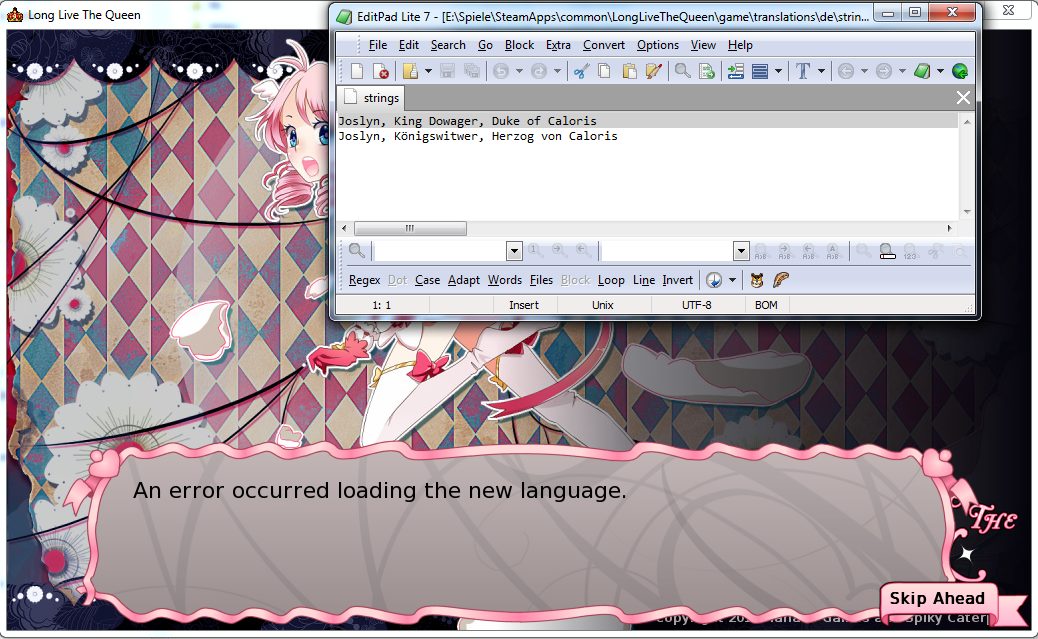
#21 by Spiky Caterpillar - Feb 15 2014
If you upload a zip or tarball of your translation directory somewhere, I can take a look at it.#22 by Luchsen - Feb 20 2014
That would be nice.Ohana:
If I get permission I can provide template blanks for all of the bitmap buttons with text, but some may take a while to make due to how they are composited.

#23 by Derevo - Jun 19 2014
We have found that some lines are not translating. What we found:#24 by Derevo - Sep 30 2014
Regarding new alpha, is there anything that could, theoretically, break translations?
#25 by hanako - Sep 30 2014
edit: http://spikycaterpillar.com/long_live_the_queen/changes.html#26 by Spiky Caterpillar - Oct 1 2014
There have been typo fixes and some improvements to the dossiers, both of which will need retranslation. The easiest way to get a handle on the changes is probably to go over http://spikycaterpillar.com/long_live_the_queen/translation/translations-1.2.24-1.2.27.diffDerevo:
Regarding new alpha, is there anything that could, theoretically, break translations?