Hanako Games

News, Walkthroughs, and Chat about Anime Games

Debug Codes


hanako

Debug Codes

#1 by hanako - Oct 17 2012

Now that the game has been out for a while and the new graphics update is out, the codes can be posted publicly.

However, I will reiterate that it is REALLY not a good idea to use these until you have managed to reach coronation at least once on your own, because you'll end up missing most of the game that way. Smile

Long Live The Queen cheat codes

Be warned - it is possible to use cheat codes to put the game in an
impossible state. It's possible you might have to go back to an
un-cheated save to continue playing.

To input cheat codes, find the debug console button (Depending on the game version, it is either on the main options menu or in the Video Settings screen). Enter codes as described below, then hit enter twice after you finish so that the code will take effect.

If you want to temporarily change your skill, set
(the skill name in lower-case, with all spaces changed to underscores) to
a new number, like this:

To set Court Manners to 85:
court_manners = 85

To set Flattery to 0:
flattery = 0

This will give you a temporary bonus that goes away when you next take
a class (rather like the bonuses caused by clothes.)

To change your base skill (so it WON'T reset when you take classes,
use the variable name followed by an underscore. For example:
composure_ = 50
public_speaking_ = 65

Most skill checks use the temporary values, NOT the permanent values.
Note that changing the permanent value will not affect the temporary
value until after you next take a class.

Special note: Voice is controlled using the voice_skill and voice_skill_
variables, because the name 'voice' is reserved by the engine.

If you want to change the amount of money you have:
lassi=9001

To change your outfit, set the current_outfit variable. For example,
current_outfit='royal_demeanour' # Note the British spelling.
will put on the Royal Demeanor bonus outfit.

If you want to add an outfit to your wardrobe:
unlocked_outfits.add('Conversation')
will add the bonus outfit for the Conversation skill group. unlocked_outfits
expects the name to be exactly as it's displayed in the class list.

The full list of outfits is:
royal_demeanour, conversation, art, agility, weapons, athletics, animals,
history, intrigue, medicine, economics, military, faith, lumen

marilhama16

#2 by marilhama16 - Oct 18 2012

Thats great! Thank you hanako, but somehow this isn't working for me Sad.

Ikaru

#3 by Ikaru - Oct 19 2012

They don't take effect until you have taken a class, any class. And then they all take effect.
I may be schizophrenic... but at least I have eachother.

I'm not random, you just can't think as fast as me.

Due to the current financial restraints the light at the end of the tunnel will be turned off until further notice.

firegirl957

#4 by firegirl957 - Oct 23 2012

For some reasons I can't seem to get the cheats for the outfits to work. I don't know what i'm doing wrong...

Spiky Caterpillar

#5 by Spiky Caterpillar - Oct 23 2012

What error message do you get trying to use the outfit cheats? What exactly are you typing in?

Rhidian

#6 by Rhidian - Oct 27 2012

I go away for a few months, and come back to find that the codes can be posted publicly Very Happy Shame to see that my legacy hasn't lived on though... my Big Lists are most likely outdated, and my cursory glance over the forums indicates no one else has really taken up the work.

That said, when you say "the codes", do you mean all codes? Or just the ones you posted in the first post here? I still have that list of every debugger function (ie codes) that were there a few months ago.

Hrm... after updating, I don't seem to have access to the Debugger Console anymore. Has it been removed in 1.1, or is it simply invisible until you beat one playthrough on 1.1 first?

hanako

#7 by hanako - Oct 27 2012

It got moved to a slightly different location. It's not gone though, just on a different screen. Look on the Video Settings screen?

You can paste your codes as well now if you want. Smile I can't recall if there was anything in there that looked particularly problematic. I'd have to discourage pasting anything too game-breaky (there are all sorts of ways to crash the game from the debugger if you're trying!) Just put it in white and we can trim anything that looks likely to cause explosions?

Rhidian

#8 by Rhidian - Oct 27 2012

Given that you already have the most-useful-for-an-average-player codes covered, I was thinking of the codes that might be of interest to someone like me (ie wanting to explore the depths of the console).

Something possibly fun to play around with:
moodbubble(str('Long Live the Queen'))


Always include the single quotes for Strings; numbers and stuff are fine *only* if they are within the str() block... if you just had moodbubble(5) or some other number then LLTQ will crash

hanako

#9 by hanako - Oct 27 2012

Rhidian:

Given that you already have the most-useful-for-an-average-player codes covered, I was thinking of the codes that might be of interest to someone like me (ie wanting to explore the depths of the console).
Yeah *that's* the sort of stuff not best pasted here, for a couple of reasons. Anyone who actually understands that can find it without it being pasted, and almost anyone looking at that without understanding it is going to create a disaster. Smile

I was just figuring you wanted to post the codes for modifying the hidden stats Razz

Rhidian

#10 by Rhidian - Oct 27 2012

Fair enough. The remaining code in that last post should allow the sufficiently interested to discover the gateway codes, since it is basically what I used.

Let's see... looking at my old PM's, here's a few codes that I passed out a while back that aren't included in the first post of this topic:


To change the skill bonus you have for learning stuff each week (replace stuff in parenthesis with the appropriate name/number):
(skill group)_bonus = (number)


To change your mood values, use the following format:
(mood) = (number from -5 to 5)
With (mood) being one of the following-
anger
cheerfulness
willful
crowded

anger = -5 will make Elodie Afraid (the opposite end of the spectrum from Angry)


To instantly change your mood after changing the mood values:
determine_mood()

To update your skill bonuses from an updated mood:
update_bonuses()


Looking over the code list for v1.1, I notice some things that I haven't seen before...

Seems that changing moods is more streamlined, if you use the following function:
inc_(mood type)()

For example:
inc_angry() will increase your anger by 1, and will instantly update your mood/bonuses if appropriate (you may need to reload mood screen to see a visible change though)

Likewise, inc_afraid() will increase your Afraid mood by 1 (or conversely, decreasing the anger variable by 1)

Looking over the list, one function that seems like it might be useful is
neutralize_mood()
Which apparently takes an Integer as an argument... but I'm not exactly sure what it does. Nothing visible happens when I tried it out.

Rhidian

#11 by Rhidian - Oct 27 2012

hanako:

I was just figuring you wanted to post the codes for modifying the hidden stats Razz
Speaking of Hidden Stats:


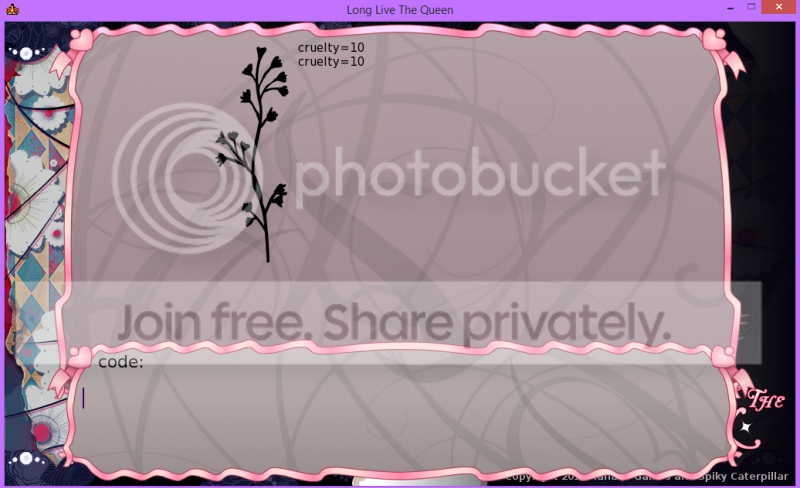
commoner_approval
noble_approval
cruelty
lassi

Cruelty normally goes 0-10


I think there is some stuff that affects army strength as well, but I'm not completely confident about them yet since I'm just browsing over the stuff in Week 0 (where there is no army).

VeraKeisey

#12 by VeraKeisey - Nov 2 2012

Cool Cool, but i can not see it clearly, CUZ the white colour.


hanako

#13 by hanako - Nov 2 2012

That's the point. To make it so people have to go to at least the effort of highlighting the text instead of just automatically cheating the minute they start playing the game. Smile

Spiky Caterpillar

#14 by Spiky Caterpillar - Sep 10 2013

Rhidian:

Looking over the list, one function that seems like it might be useful is
neutralize_mood()
Which apparently takes an Integer as an argument... but I'm not exactly sure what it does. Nothing visible happens when I tried it out.


neutralize_mood(mood,amt=1) doesn't change the current mood value, it just returns mood neutralized by amt.

hanako

Re: Debug Codes

#15 by hanako - Sep 10 2013

(Nothing to see here, I just noticed the new forum version had a 'bump topic' option and wanted to bring this topic up because people were asking about the codes again. But since that made it look like Spiky had said something, I then posted this instead.)

ArisuTan

Re: Debug Codes

#16 by ArisuTan - Sep 17 2013

I've played through the game and gotten death twice,
I tried to use the Debug codes but it won't work
trade_=60
doesn't work...anybody has the same problem or knows how to make it work?

Karlminion

Re: Debug Codes

#17 by Karlminion - Sep 18 2013

Are you putting a space between the variables?

trade_=60

should be:

trade_ = 60

Try it again, and remember that permanent stat boosts only take effect after you have classes. Temporary bonuses last until classes. Good luck! ^^

Miakoda

Re: Debug Codes

#18 by Miakoda - Oct 13 2013

I was playing around with the debug codes, and manage to get almost all of them to work, except for unlocking the outfits for royal_demeanour and animals. Do others have this problem?

For the code to work, I do have to capitalize the first letter of the skill group, and all but the two mentioned above worked.
unlocked_outfits.add=('X') where X could be Conversation, Weapons, etc.

SilverBloodIllusion

Re: Debug Codes

#19 by SilverBloodIllusion - Oct 14 2013

I've never been able to get Wield Magic or Battlefield Medicine to work. Can someone help?

Miakoda

Re: Debug Codes

#20 by Miakoda - Oct 14 2013

For skills with more than one word, I have managed to get it to work with an underscore

wield_magic or battlefield_medicine

SilverBloodIllusion

Re: Debug Codes

#21 by SilverBloodIllusion - Oct 14 2013

Miakoda:

For skills with more than one word, I have managed to get it to work with an underscore

wield_magic or battlefield_medicine
Thanks, I already knew that, but that hasn't worked for me on these two.

Miakoda

Re: Debug Codes

#22 by Miakoda - Oct 14 2013

Sorry if it didn't work. It may be some vague quirk of one's computer (like with me not getting those other outfits to appear).

Karlminion

Re: Debug Codes

#23 by Karlminion - Oct 14 2013

Make sure you're spelling it right, the game won't run it right and it doesn't tell you about spelling errors if the syntax and spacing and symbols are right.

Also if you want to adjust the skills permanently, you need that last underscore at the end.

wield_magic =100

is only a temporary adjustment, lasting until your next class sessions. But

wield_magic_ =100

will set it at 100 for good, once you take class sessions. Is a good idea to use the second when picking Elodie's schedule, and the first if you need to pass a skill check on the fly.

SilverBloodIllusion

Re: Debug Codes

#24 by SilverBloodIllusion - Oct 15 2013

Well, I finally got them working. They've never worked before. It might have been a glitch in the Beta I was on before or maybe my dyslexia was playing all kinds of tricks with my mind. It's so hard for me to know.

Ariel Schnee

Re: Debug Codes

#25 by Ariel Schnee - Oct 27 2013

For the outfit codes try these :


unlocked_outfits.add('Royal Demeanor')
unlocked_outfits.add('Conversation')
unlocked_outfits.add('Expression')
unlocked_outfits.add('Agility')
unlocked_outfits.add('Weapons')
unlocked_outfits.add('Athletics')
unlocked_outfits.add('Animal Handling')
unlocked_outfits.add('History')
unlocked_outfits.add('Intrigue')
unlocked_outfits.add('Medicine')
unlocked_outfits.add('Economics')
unlocked_outfits.add('Military')
unlocked_outfits.add('Faith')
unlocked_outfits.add('Lumen')
---

(Dead link removed)

Miakoda

Re: Debug Codes

#26 by Miakoda - Oct 27 2013

Thank you Neko Hibiki. The Animal and Demeanor codes work perfectly now.

LionessGrl

Re: Debug Codes

#27 by LionessGrl - Nov 14 2013

This is going to sound stupid, but how do you exit the debug screen?

Edit: Never mind, I got out but now the cheats aren't working for me.
Games I have: Fatal Hearts, Date Warp, Magical Diary, Long Live The Queen, Royal Trap

kisame_widi

Re: Debug Codes

#28 by kisame_widi - Nov 15 2013

so...actually the code didn't work well on mine...the debug screen said this

An exception occurred: name 'unlocked_outfits' is not defined

this is what i type
unlocked_outfits.add('Conversation')

Ariel Schnee

Re: Debug Codes

#29 by Ariel Schnee - Nov 15 2013

kisame_widi:

so...actually the code didn't work well on mine...the debug screen said this

An exception occurred: name 'unlocked_outfits' is not defined

this is what i type
unlocked_outfits.add('Conversation')
I just tried it myself.

It worked fine right now, no problems.

On the latest update(beta) too.
---

(Dead link removed)

Duszynski

Re: Debug Codes

#30 by Duszynski - Nov 16 2013

This is probably a dumb question, but I can't figure out how to exit the Debugger Console. There doesn't seem to be an option to exit it and I've tried hitting "escape" but that doesn't work.

hanako

Re: Debug Codes

#31 by hanako - Nov 16 2013

Once you've hit enter twice like the instructions say, the way to leave should be more obvious. Smile

Duszynski

Re: Debug Codes

#32 by Duszynski - Nov 16 2013

hanako:

Once you've hit enter twice like the instructions say, the way to leave should be more obvious. Smile
Um, I have. :/


hanako

Re: Debug Codes

#33 by hanako - Nov 16 2013

That's entering two lines of code. You need to enter one line of code, then hit enter twice. (The enter on a blank line tells the debugger to execute the code you've input so far. Until that point nothing has actually been run.)

Duszynski

Re: Debug Codes

#34 by Duszynski - Nov 16 2013

hanako:

That's entering two lines of code. You need to enter one line of code, then hit enter twice. (The enter on a blank line tells the debugger to execute the code you've input so far. Until that point nothing has actually been run.)
Oh! Thank you. I totally misunderstood. Sorry about that.

Ariel Schnee

Re: Debug Codes

#35 by Ariel Schnee - Nov 17 2013

Duszynski:

This is probably a dumb question, but I can't figure out how to exit the Debugger Console. There doesn't seem to be an option to exit it and I've tried hitting "escape" but that doesn't work.
Trying hitting 'return'.
---

(Dead link removed)

zonohedron

Re:

#36 by zonohedron - May 8 2014

Rhidian:

Speaking of Hidden Stats:


commoner_approval
noble_approval
cruelty
lassi

Cruelty normally goes 0-10
Is there a command for displaying the current value of the hidden stats (as opposed to just changing them?) I don't want to set cruelty (or any of the others) to something; I just want to know what the current value is.

Spiky Caterpillar

Re: Debug Codes

#37 by Spiky Caterpillar - May 9 2014

narrator("%(cruelty)d")
narrator("%(lassi)f")
should work. (noble_approval and commoner_approval also get a d suffix)

zonohedron

Re: Debug Codes

#38 by zonohedron - May 9 2014

That just gives me %(cruelty)d. (And the same for the others.)

Spiky Caterpillar

Re: Debug Codes

#39 by Spiky Caterpillar - May 9 2014

Oops, misremembered the code. Try
narrator(str(cruelty))

zonohedron

Re: Debug Codes

#40 by zonohedron - May 9 2014

That works! Thank you!

KironD63

Re: Debug Codes

#41 by KironD63 - Jan 18 2015

I'm entering in Debug codes correctly and getting the "Execution Successful" message, but after I select "Done" and then load my saved game, I'm not actually seeing any changes in the game I'm playing that correspond with the codes I'm entering.

hanako

Re: Debug Codes

#42 by hanako - Jan 18 2015

If you load a saved game, then immediately all the values will be changed to the values they were when the game was saved.

Histidine

Re: Debug Codes

#43 by Histidine - Nov 14 2015

So here's something I did a long time ago for my own convenience...
(wanted to post here earlier but got lazy)

Quick cheats
To install: Put cheats.rpy in LongLiveTheQueen/game

Commands:

setSkill("<skillName>", <num>)
setAllSkills(<num>)
- e.g. setSkill("public_speaking", 30)
- Sets both the temporary and permanent skill stats (i.e. takes effect immediately, won't be reset by classes)

unlockAllOutfits()

setMood("<mood>", num)
- Moods are: anger, cheerfulness, willful, crowded
- e.g. setMood("anger", -1) to have 1 Anxious
- Changes current overall mood immediately if applicable

Thanks to hanako and Rhidian for the codes.

AlwaysFr3sh

Re: Debug Codes

#44 by AlwaysFr3sh - Oct 30 2016

I recently opened the debug menu for the first time and wanted to try cheating (since I've completed the game multiple times) in the end, I didn't input any but now my game won't load properly.

When I open it with Steam then it appears in a small pop-up window and I can't click anything, it then crashes if I try to fullscreen it. Is there any way for me to fix it?
btw, a few months before a bought the game with steam, I used this website to download a trial version for the first 10 weeks, should I delete that?
Sad Sad Sad Sad Sad Sad Sad
Hanako forum archive - Topic list