Hanako Games

News, Walkthroughs, and Chat about Anime Games

Troubleshooting / Bug Reports


hanako

Troubleshooting / Bug Reports

#1 by hanako - Jun 19 2011

Opening a new thread for this now that the game is complete.

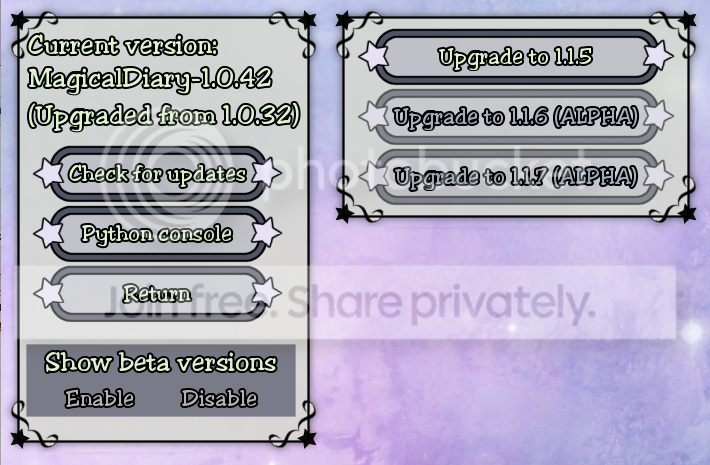
First, always post the version number of your version of Magical Diary in any bug report! You can check your version number by going to the Options screen and selecting *Updater* - it will show you the current version, the original version, and any partial update information. From here you can also see if there have been any new patches that you might want to download.

If you need to upload saved games or screenshots (or any type of file, actually) to us and don't have your own webspace, you can use the form at http://spikycaterpillar.com/savegame-upload.html to send the files.

If you encounter errors during the game, press the Upload Traceback button. That will automatically send us information on what's gone wrong. This is the best way for us to track down the error. Always upload your traceback first before trying to find a way to work around it!

If you encounter graphical bugs, you can take screenshots from inside the game by pressing the S key (in most places.). If you encounter display corruption, or if a bug shows up onscreen but NOT in the screenshot, the bug is probably a GL bug and you'll need to post the opengl.txt file the game produces.

If you're using Windows 7 or Vista, text files and screenshots may wind up being dropped in C:\Users\(Your_user_name)\AppData\Local\VirtualStore\Program Files\(Application_name) . Otherwise, text files and screenshots should be dropped in the main game directory.

silvername

Erro in the game

#2 by silvername - Jun 22 2011

I got the the third dungeon. I use telepyre to make the treasure box explode meanwhile i was far away and I got an error T__T. Is there a way to fix it. If it give you the option to cast the spell fro far away so you don't get hit by the flames why am I getting the error D=

this is what I got:

I'm sorry, but an uncaught exception occurred.

Exception: Unable to remove <store.Sphere object at 0x0BFEB510> from cell 2,0

While running game code:
- script call at line 724 of /home/deekoo/code/renpy-projects/MagicalDiary/game/chapter1.rpy
- script call at line 4980 of /home/deekoo/code/renpy-projects/MagicalDiary/game/dungeon.rpy
- script at line 3472 of /home/deekoo/code/renpy-projects/MagicalDiary/game/dungeon.rpy
- python at line 3477 of /home/deekoo/code/renpy-projects/MagicalDiary/game/dungeon.rpy.
- python at line 1897 of /home/deekoo/code/renpy-projects/MagicalDiary/game/dungeon.rpy.
- python at line 1201 of /home/deekoo/code/renpy-projects/MagicalDiary/game/dungeon.rpy.
- python at line 1081 of /home/deekoo/code/renpy-projects/MagicalDiary/game/dungeon.rpy.
- python at line 1005 of /home/deekoo/code/renpy-projects/MagicalDiary/game/dungeon.rpy.

-- Full Traceback ------------------------------------------------------------

File "C:\Program Files\Magical Diary - Horse Hall\renpy\bootstrap.py", line 270, in bootstrap
File "C:\Program Files\Magical Diary - Horse Hall\renpy\main.py", line 382, in main
File "C:\Program Files\Magical Diary - Horse Hall\renpy\main.py", line 140, in run
File "C:\Program Files\Magical Diary - Horse Hall\renpy\execution.py", line 259, in run
File "C:\Program Files\Magical Diary - Horse Hall\renpy\ast.py", line 574, in execute
File "C:\Program Files\Magical Diary - Horse Hall\renpy\python.py", line 957, in py_exec_bytecode
File "/home/deekoo/code/renpy-projects/MagicalDiary/game/dungeon.rpy", line 3477, in <module>
File "/home/deekoo/code/renpy-projects/MagicalDiary/game/dungeon.rpy", line 1897, in flame_damage
File "/home/deekoo/code/renpy-projects/MagicalDiary/game/dungeon.rpy", line 1201, in damage
File "/home/deekoo/code/renpy-projects/MagicalDiary/game/dungeon.rpy", line 1081, in damage
File "/home/deekoo/code/renpy-projects/MagicalDiary/game/dungeon.rpy", line 1005, in remove_from_cell
Exception: Unable to remove <store.Sphere object at 0x0BFEB510> from cell 2,0

While running game code:
- script call at line 724 of /home/deekoo/code/renpy-projects/MagicalDiary/game/chapter1.rpy
- script call at line 4980 of /home/deekoo/code/renpy-projects/MagicalDiary/game/dungeon.rpy
- script at line 3472 of /home/deekoo/code/renpy-projects/MagicalDiary/game/dungeon.rpy
- python at line 3477 of /home/deekoo/code/renpy-projects/MagicalDiary/game/dungeon.rpy.
- python at line 1897 of /home/deekoo/code/renpy-projects/MagicalDiary/game/dungeon.rpy.
- python at line 1201 of /home/deekoo/code/renpy-projects/MagicalDiary/game/dungeon.rpy.
- python at line 1081 of /home/deekoo/code/renpy-projects/MagicalDiary/game/dungeon.rpy.
- python at line 1005 of /home/deekoo/code/renpy-projects/MagicalDiary/game/dungeon.rpy.

Ren'Py Version: Ren'Py 6.11.2b

hanako

#3 by hanako - Jun 22 2011

We'll look into it - in the meantime, can you check what version number of the game you're playing?

When fixes are available, you can download them from inside the game by using the updater like it says on the first post. You won't need to reinstall the game or anything like that, it's just a simple update. Smile

I'm fairly sure that I *have* used Telepyre on the box without an error in the past. Are you sure you hit the right location? Was the sphere also in that location? Just checking as that will make it easier for us to find the problem.

silvername

#4 by silvername - Jun 22 2011

thank you for the quick reply *-*

yes I got the sphere and the treasure box in the same spot. I was standing on the east side of the map when I cast it. I used lighting as well and it did work. and I just checked the updater. I am downloading the version 1.0.5. I got the 1.0 xD.

thank you so much, Hanako!! u.u

Muse

#5 by Muse - Jun 23 2011

I think I found a couple small typos.

Version is 1.0.5.

I think I've found some spots of double spacing
"I start to applaud, but freeze as I realize that no one else is. Then Virginia, beside me, picks up the clapping, loudly. Soon the whole room is cheering."
It looks like there is two spaces between "the" and "clapping".

Another time that seems to have double spacing is after italicized words; I'm not sure if it's just the font or what but the space after them seems larger than the rest on all of the italic phrases I see. Some examples are:
"his" and "classes":
"Uh oh. This is one of his classes."
"really" and "cut":
"... He wouldn't really cut off students' fingers, would he?!?"
"us" and "should":
"Maybe more of us should drop out."
"earth" and "are":
"The winged girl laughs. What on earth are they talking about?
"really" and "likes":
"I got Balthasar Brundrick. He likes plants. He really likes plants. I think he's got moss growing on him."
"Look" and "at":
"Look at him! He's a demon!"

Here is one that is missing a space between "meeting" and "today", and also a semicolon instead of a comma after "So don't worry":
"My roommates and I have started a sports club. We had our first meetingtoday and played some pickup soccer. So don't worry, I'm getting plenty of exercise."

Another spot that is missing a space is in the part "me'n'Luke" (should be "me 'n' Luke":
Logan's doing this thing, and he asked me'n'Luke to round up people for it."

And then a period used where I believe you either meant a comma, or to capitalize the "and" after it:
"Red magic is forceful, but not necessarily violent. Blue is the color of transformation and change. Green is the color of life. and the world of plants and animals."

A comma is used here when you want a semicolon (after "try to figure it out"):
"This is silly. Spies never hear anything nice. I have no idea what they're discussing and I shouldn't try to figure it out, I'll only come up with crazy stuff. I'm just going to walk away."

Another case of wanting a semicolon instead of a comma (after "with Initiation"):
"Poor Ellen's had a hard time of it this week with Initiation, I'm sure she's glad that it's all over."

Two more cases of commas instead of semicolons (or separate sentences) here:
"One hundred percent mechanical and campus legal, I checked. Take a handful of covers, you'll need them. Is everyone paid up?"

Here is a point where "oh no" should be in quotes, since you are repeating what Virginia says:
"What do you mean, oh no?"

Also, there is a point where you use the British spelling of a word instead of the American, and I don't know if that is intentional: realise is used instead of realize.
"Which just makes me realise... I miss my family."
The same thing happens later with:
"I'm sorry. I didn't realise." when speaking with Damien after break.
"Either I'm more confused than I realise, or some kind of trap is redirecting me despite my precautions." is another case. There are probably more I haven't found.

Also, when you join the secret society, and the hooded figure first appears, his character does a little jump up (in that his portrait was slightly lower on the screen then is higher) that I am unsure if it is on purpose or not. At the line: "Wait! There's someone."


Edit: Found another comma used when you want a semicolon:
"You're not! You're one of the smartest people here, you know that. You're a good witch!"

dbn2240

Bug Report

#6 by dbn2240 - Aug 8 2011

I just updated my game to 1.0.21 and whenever I try to turn on the game I get this error:

I'm sorry, but an uncaught exception occurred.

KeyError: 'pleasant'

While executing init code:
- script at line 291 of /home/deekoo/code/renpy-projects/MagicalDiary/game/week32.rpy
- python at line 291 of /home/deekoo/code/renpy-projects/MagicalDiary/game/week32.rpy.
- python at line 1295 of /home/deekoo/code/renpy-projects/MagicalDiary/game/magical_diary.rpy.

-- Full Traceback ------------------------------------------------------------

File "C:\Program Files\Magical Diary - Horse Hall\renpy\bootstrap.py", line 270, in bootstrap
File "C:\Program Files\Magical Diary - Horse Hall\renpy\main.py", line 327, in main
File "C:\Program Files\Magical Diary - Horse Hall\renpy\execution.py", line 259, in run
File "C:\Program Files\Magical Diary - Horse Hall\renpy\ast.py", line 647, in execute
File "C:\Program Files\Magical Diary - Horse Hall\renpy\python.py", line 981, in py_eval_bytecode
File "/home/deekoo/code/renpy-projects/MagicalDiary/game/week32.rpy", line 291, in <module>
File "/home/deekoo/code/renpy-projects/MagicalDiary/game/magical_diary.rpy", line 1295, in GrabinerSprite
KeyError: 'pleasant'

While executing init code:
- script at line 291 of /home/deekoo/code/renpy-projects/MagicalDiary/game/week32.rpy
- python at line 291 of /home/deekoo/code/renpy-projects/MagicalDiary/game/week32.rpy.
- python at line 1295 of /home/deekoo/code/renpy-projects/MagicalDiary/game/magical_diary.rpy.

Ren'Py Version: Ren'Py 6.11.2b

--------------------------------------
Is there anyways I can have this fixed. I really like playing this game. :<

Spiky Caterpillar

#7 by Spiky Caterpillar - Aug 9 2011

Hm. What version of Windows are you using? What version of the game did you update from?

The first thing to try is deleting the file C:\Program Files\Magical Diary - Horse Hall\game\bytecode.rpyb (if you have Windows set to hide file extensions, this file may be called 'bytecode' or 'Bytecode') and starting the game again.

dbn2240

#8 by dbn2240 - Aug 20 2011

I am using Windows 8.0 and I am not exactly sure which version I updated from...

Spiky Caterpillar

#9 by Spiky Caterpillar - Aug 22 2011

Eight? That's not even out yet, is it?

You can find the original game version in C:\Program Files\Magical Diary - Horse Hall\game\original_game_version . Also, tell me the file size (in bytes, not disc space used) for week32.rpyc and magical_diary.rpyc. (both in the game directory.)

If deleting bytecode.rpyb doesn't work:
- Make a backup of the game directory, since these steps *might* break the game.
- Delete week32.rpyc (and bytecode.rpyb, if it exists.)
- Start the game. It should now start, but will crash when you reach the
last week of the game.
- Use 'reset to 1.0.21' or 'upgrade to 1.0.22' on the updater screen. This should re-download the last week.

If you have a multi-boot system, does the game work in any other version of Windows, or in Wine?

This sort of problem is most likely caused by something that prevented the game from replacing existing files during the update; some antivirus programs can do that, as can Windows UAC if the process wasn't elevated properly. While I have special code in the updater to work with Vista and Seven, it's possible that Eight changes the way that UAC works.

If it is a UAC problem, then copying the entire game folder to the desktop and running from there (after killing week32.rpyc and bytecode.rpyb') may allow you to update/reset properly.

Filesystem corruption and hardware problems can theoretically also cause problems like this, though you will usually notice other programs having problems or general system instability if it's hardware-related.

Tielle

#10 by Tielle - Aug 22 2011

I debated with myself a little before deciding to post this here, as my problem isn't with the full game but with the demo of it. It won't run for me (I've got Windows 7, if that helps at all). Sad

Trying to start it, I get a second or so of a little rectangle in my screen that has "Magical Diary" beneath an open book, with a few little symbols above it. Screen flickers between black and my desktop (once with a resized desktop) before settling back to desktop as normal and no program running. Trying it as administrator returns the following:


I'm sorry, but an uncaught exception occurred.

ValueError: subsurface rectangle outside surface area

While running game code:
- script call at line 731 of renpy-6.11.2/common/00library.rpy
- script call at line 184 of /home/deekoo/code/renpy-6.11.2b/common/00gltest.rpy
- script at line 1040 of /home/deekoo/code/renpy-projects/MagicalDiaryDemo/game/enginepatch.rpy
- python at line 1046 of /home/deekoo/code/renpy-projects/MagicalDiaryDemo/game/enginepatch.rpy.

-- Full Traceback ------------------------------------------------------------

File "C:\Program Files (x86)\Magical Diary - Horse Hall - Demo\renpy\bootstrap.py", line 270, in bootstrap
File "C:\Program Files (x86)\Magical Diary - Horse Hall - Demo\renpy\main.py", line 382, in main
File "C:\Program Files (x86)\Magical Diary - Horse Hall - Demo\renpy\main.py", line 140, in run
File "C:\Program Files (x86)\Magical Diary - Horse Hall - Demo\renpy\execution.py", line 259, in run
File "C:\Program Files (x86)\Magical Diary - Horse Hall - Demo\renpy\ast.py", line 574, in execute
File "C:\Program Files (x86)\Magical Diary - Horse Hall - Demo\renpy\python.py", line 957, in py_exec_bytecode
File "/home/deekoo/code/renpy-projects/MagicalDiaryDemo/game/enginepatch.rpy", line 1046, in <module>
File "C:\Program Files (x86)\Magical Diary - Horse Hall - Demo\renpy\ui.py", line 216, in interact
File "C:\Program Files (x86)\Magical Diary - Horse Hall - Demo\renpy\display\core.py", line 1608, in interact
File "C:\Program Files (x86)\Magical Diary - Horse Hall - Demo\renpy\display\core.py", line 1951, in interact_core
File "C:\Program Files (x86)\Magical Diary - Horse Hall - Demo\renpy\display\core.py", line 1311, in draw_screen
File "C:\Program Files (x86)\Magical Diary - Horse Hall - Demo\renpy\display\swdraw.py", line 870, in draw_screen
File "C:\Program Files (x86)\Magical Diary - Horse Hall - Demo\renpy\display\swdraw.py", line 634, in do_draw_screen
ValueError: subsurface rectangle outside surface area

While running game code:
- script call at line 731 of renpy-6.11.2/common/00library.rpy
- script call at line 184 of /home/deekoo/code/renpy-6.11.2b/common/00gltest.rpy
- script at line 1040 of /home/deekoo/code/renpy-projects/MagicalDiaryDemo/game/enginepatch.rpy
- python at line 1046 of /home/deekoo/code/renpy-projects/MagicalDiaryDemo/game/enginepatch.rpy.

Ren'Py Version: Ren'Py 6.11.2b

hanako

#11 by hanako - Aug 22 2011

Reporting demo problems is still good - it may turn out that your computer just can't run the game, but if we can fix it, we want to!

What sort of computer are you using? I know you said Windows 7, but is it a laptop, a netbook? What resolution is your desktop set to?

Try holding down shift while you double-click on the game. If that works right, you should get a menu of display options. If you do, try choosing 'Prefer Software Renderer' and see if that makes the game work. If holding down shift does nothing, tell us that.

Spiky may have more suggestions later, this is just my first pass. Smile

Tielle

#12 by Tielle - Aug 22 2011

Holding down shift worked, and now I can start the demo just by double clicking normally. Smile

I've got a regular desktop computer, a Dell Studio XPS 8100. Resolution's set at 1920 x 1080.

Spiky Caterpillar

#13 by Spiky Caterpillar - Aug 22 2011

What version of the demo do you have? (It will show the current version in Options: Updater.)

Tielle

#14 by Tielle - Aug 23 2011

1.0.5, just what was available from the website the other day

holeena

Updating to 1.0.22

#15 by holeena - Aug 24 2011

Bought the game at 1.0.9 and haven't updated until 0.22 released.
When I update from 1.0.9 everything runs smoothly, the game restarts and it loads the new data and says "DONE" to everything. But when I check if the updates are in place e.g. the Wiggle Wand, it's not in the store.

So I try to downgrade the version but the only version I can choose is 0.22 and when I do so, I get this error message:


I'm sorry, but an uncaught exception occurred.

AttributeError: 'NoneType' object has no attribute 'filename'

While running game code:

-- Full Traceback ------------------------------------------------------------

File "C:\Program Files (x86)\Magical Diary - Horse Hall\renpy\bootstrap.py", line 270, in bootstrap
File "C:\Program Files (x86)\Magical Diary - Horse Hall\renpy\main.py", line 382, in main
File "C:\Program Files (x86)\Magical Diary - Horse Hall\renpy\main.py", line 116, in run
File "C:\Program Files (x86)\Magical Diary - Horse Hall\renpy\warp.py", line 101, in warp
AttributeError: 'NoneType' object has no attribute 'filename'

While running game code:

Ren'Py Version: Ren'Py 6.11.2b

--

Thanks Hanako & Spiky Smile

hanako

#16 by hanako - Aug 24 2011

Don't downgrade unless you're willing to have to reinstall your entire game from scratch! There are big warnings telling you not to! Don't do it!

We're currently looking into the weirdness with the Wiggle Wand. It's definitely present in the later versions, but for whatever reason it won't show up in the store right now in anything updating straight to 1.0.20 or later from an early version. (At least, this behavior is confirmed in Windows. If you're using something other than Windows please let me know.) Not sure why, doing some tests, should hopefully have a new update later.

As best as I can tell everything else is working okay when updating - if you run into anything else strange please let us know.

Spiky Caterpillar

#17 by Spiky Caterpillar - Aug 24 2011

I believe the Wiggle Wand weirdness (and several other bugs in versions between 1.0.18.1 and 1.0.22) has been fixed as of beta 1.0.25.7.

Downgrading from anything between 1.0.22 and 1.0.18.1 to 1.0.18.1 may also work again, but downgrading is not guaranteed.

summers1989

Update Malfunction

#18 by summers1989 - Aug 24 2011

I tried to update to the latest version of Magical Diary and when I did, it gave me this code on notebook and wouldn't let me update.
I'm sorry, but an uncaught exception occurred.

AttributeError: 'NoneType' object has no attribute 'filename'

While running game code:

-- Full Traceback ------------------------------------------------------------

File "C:\Program Files\Magical Diary - Horse Hall\renpy\bootstrap.py", line 270, in bootstrap
File "C:\Program Files\Magical Diary - Horse Hall\renpy\main.py", line 382, in main
File "C:\Program Files\Magical Diary - Horse Hall\renpy\main.py", line 116, in run
File "C:\Program Files\Magical Diary - Horse Hall\renpy\warp.py", line 101, in warp
AttributeError: 'NoneType' object has no attribute 'filename'

While running game code:

Ren'Py Version: Ren'Py 6.11.2b

hanako

#19 by hanako - Aug 24 2011

From what version to what version were you updating, if you know?

We had a bit of a weird mess for a few versions there, which should hopefully now be fixable, but depending on what people had in between, strange things could happen until everyone gets the fix.

holeena

#20 by holeena - Aug 24 2011

Thanks for the quick redressing of the problem! I am running on Windows 7 and Norton Antivirus enabled if that helps anything.

@Hanako, for some reason downgrading (and in my case and few uninstall and reinstall moments) let me keep my save files. I suppose I was just lucky nothing went awry and erased anything.

So I just updated 0.9 to 0.18.1 and then from there to 25.6 and Wiggle Wand is present in both instances.

Thanks!

summers1989

#21 by summers1989 - Aug 26 2011

hanako:

From what version to what version were you updating, if you know?

We had a bit of a weird mess for a few versions there, which should hopefully now be fixable, but depending on what people had in between, strange things could happen until everyone gets the fix.
I was trying to update from version 1.0.22 to version 1.0.25.7

Spiky Caterpillar

#22 by Spiky Caterpillar - Aug 26 2011

@summers1989:

Is the error repeatable? If so, try:
- turning off any virus scanners and trying again.
- If you still have a copy of the installer, downgrading (You can back up your saves by finding the MagicalDiaryHorseHall folder and making a copy of it) to 1.0.18.1 and then upgrading to 1.0.25.7.

Ladygothika87

#23 by Ladygothika87 - Aug 26 2011

I'm sorry, but an uncaught exception occurred.

AttributeError: 'NoneType' object has no attribute 'filename'

While running game code:

-- Full Traceback ------------------------------------------------------------

File "C:\Program Files\Magical Diary - Horse Hall\renpy\bootstrap.py", line 270, in bootstrap
File "C:\Program Files\Magical Diary - Horse Hall\renpy\main.py", line 382, in main
File "C:\Program Files\Magical Diary - Horse Hall\renpy\main.py", line 116, in run
File "C:\Program Files\Magical Diary - Horse Hall\renpy\warp.py", line 101, in warp
AttributeError: 'NoneType' object has no attribute 'filename'

While running game code:

Ren'Py Version: Ren'Py 6.11.2b


I received the same error as summers1989 and tried turning off my avg virus protection before updating and it didn't work. When I tried downgrading it came up the same thing and changing my avg settings don't seem to be working. Never had problems updating before and I waited to see if someone else had the same problem, which they did, but what you told them to do doesn't seem to work on mine. I am using Windows Vista if that helps any.

hanako

#24 by hanako - Aug 26 2011

Spiky's not sure how to fix it yet, he's just suggesting stuff to see what happens.

Unfortunately, because the updater was serving out incomplete updates for a few versions there (18 through 22 as far as we can tell) things have gotten broken in weird ways.

So far it looks like the only person who's managed to get past this uninstalled the game, then reinstalled and patched up to the latest version which no longer has incomplete updates. I don't like officially recommending that, but IF you still have an installer and IF your installer is at least 1.0.9 it might be reasonable to try it.

If you first installed back in the alpha period, it's probably best to uninstall, then manually delete your game directory to make sure no old files are left around, then request a new installer download from me (forward your receipt to owner@hanakogames) It is not a good idea to try updating from a really really really old installer Smile

Savegames aren't kept in the game install directory so you can delete it without losing them.

Spiky Caterpillar

#25 by Spiky Caterpillar - Aug 27 2011

I have a couple more possible workarounds. Unfortunately, neither of these are tested since I don't have a copy of the game that actually shows the bug.

First - delete (or rename) bytecode.rpyb in the game directory and see if that works.

If that doesn't work: The game will automatically back up changed files when you upgrade; copying all the .old files from game/cache/1.0.9/game/ into the game/ directory and replacing the corresponding .rpycs may work.

If you have a broken game that's failing to update with "AttributeError: 'NoneType' object has no attribute 'filename'", zipping up all the .rpyc and .rpyb files in the game directory and uploading the resulting zip to http://spikycaterpillar.com/savegame-upload.html will help me test fixes. (And then PM me to let me know it's uploaded.)

sophie1996

#26 by sophie1996 - Sep 20 2011

My current version is 1.0.25.7 (upgraded from 1.0.13) and I've been trying to update my game to 1.0.26 and when i click to update it shuts down and brings up a box, and then it restarts and it's still on version 1.0.25.7

Spiky Caterpillar

#27 by Spiky Caterpillar - Sep 20 2011

What does the box say? What operating system (and OS version) are you using? Are there any error messages?

sophie1996

#28 by sophie1996 - Sep 20 2011

Windows xp but now when i click on updates it says :

An error occured trying to get the latest updatelist: updatexception("could not download 'http://updates.spikeycaterpillar.com/magicaldiary//latest':URL error(1006',' no connection could be made because the target machine actively refused it ' ),)",)

Spiky Caterpillar

#29 by Spiky Caterpillar - Sep 20 2011

It's working from here.

Does http://updates.spikycaterpillar.com/magical_diary/latest load in a web browser? (or allow you to save the file)? Do you have any firewalls running that might be blocking the connection? Are you using any form of proxy to access the network?

If the update list loads in a web browser but the game gives a 'connection refused' message, then the problem is most likely to be a firewall or proxy conflict.

eli555

#30 by eli555 - Sep 20 2011

When I update my game it says "unable to write the game directory. Not updating." :/ what does that mean?

Spiky Caterpillar

#31 by Spiky Caterpillar - Sep 21 2011

The updater cannot write new files to the game directory, and so cannot update the game.

This can happen if the game files are owned by a different user account than the one you're trying to run the updater from, if you're trying to run the game from a read-only disc, or if some of the files or directories are read-only. It might also happen if another program is blocking write access to the directory (anti-virus software often protects programs from modification, which is good most of the time, not so good when you're trying to modify them), or possibly if UAC elevation failed somehow.

What version of the game do you have, and what operating system version do you have? Have you ever updated successfully in the past?

monele

#32 by monele - Feb 1 2012

Hello, I just had a trace report (which I uploaded using the in-game button) when trying to upload my yearbook.

I seem to be running version 1.0.13 (didn't even think to update before playing, I assumed the installer I got was the latest version).

Is there anything else I should do to complete the bug report? And should I actually update the game (I plan to have another run through soon). If so, should I stick to stable versions or are the beta/alpha stable enough to be worth a try? ^.^

hanako

#33 by hanako - Feb 1 2012

In general, never touch an alpha patch unless we have specifically told you as an individual to do so. They mostly exist for internal testing so that I can check new stuff that's JUST been added to the game to see if it explodes, which it may well do.

Beta means that I have given it a quick check and it didn't blow up in any obvious fashion so it's now available for general players to test. We haven't been adding new content lately so it's doubtful that there's anything super-interesting lurking in beta. If and when we can patch in new paths, betas are worth trying.

It's always a good idea to update to the latest stable - any bug you encounter might already have been dealt with! Smile There's a changelog here: http://spikycaterpillar.com/magical_diary/changelog.html - *most* of what's been added since is handfuls of bug fixes and the new wand item for the store.

monele

#34 by monele - Feb 2 2012

Just updated to latest stable (1.0.18.1). I still get the yearbook upload crash, so I uploaded the traceback again (if only so you see it linked to that version too).

Spiky Caterpillar

#35 by Spiky Caterpillar - Feb 12 2012

I've updated the yearbook so it handles non-ASCII characters somewhat better - if you update to alpha 1.0.27, you should probably be able to upload your yearbook page without crashing.

wings9008

How to delet

#36 by wings9008 - Aug 8 2012

How can I delete a save file in the game, I am on windows 7..

thezooqueen

having same problems with this sites dull version as steam

#37 by thezooqueen - Aug 12 2012

I have the steam copy and I have uninstalled it from my computer and given it to my daughter, I purchased your full copy from your site because I wanted the python console thing. But after I go through all that I still have the same problem like it was a steam version. I so not know what I need to post for you. But my file folder has all the file I think. Considerably more than my steam file did. No previous files were left on the computer

hanako

#38 by hanako - Aug 13 2012

The flag that makes the difference is stored in the game preferences, not the game install folder. It's the same location that has your saved games and other options like volume controls, speed controls, window/fullscreen controls and so on. It's also the file that keeps track of what text you've already read in the game to allow you to skip previously read text.

So uninstalling the Steam copy won't affect it in any way, it'll still be stored on that computer just like the saved games are.

That's why I've generally not been recommending that steam users buy the other version, because while it's POSSIBLE to delete that and get access to the console, it means throwing out some of your existing data. We do intend to put in an update to the Steam version at some point to make that console available, we've just been swamped with things to do lately.

If that's the only reason you bought another copy I can refund your purchase if you'd like.

Otherwise if you want we can tell you how to get rid of your old preferences file.

thezooqueen

#39 by thezooqueen - Aug 13 2012

Thank you please tell me how to get rid of the preference file If it is too hard then we can talk possible refund. I have several several games on steam

Spiky Caterpillar

#40 by Spiky Caterpillar - Aug 13 2012

Search for a folder named MagicalDiaryHorseHall. In it, there will be a file called 'persistent'. Rename it to something else and the updater should become available.

The default locations are:
MacOS X: ~/Library/RenPy/MagicalDiaryHorseHall/
Windows XP and 2000: C:\Documents and Settings\(your username)\Application Data\RenPy\MagicalDiaryHorseHall\
Windows Seven and Vista: C:\Users\(your username)\AppData\Roaming\RenPy\MagicalDiaryHorseHall\

thezooqueen

#41 by thezooqueen - Aug 13 2012

Thank you both so very much it appears to work now Smile <3

koratelar

Steam Download

#42 by koratelar - Aug 23 2012

I liked the demo, the demo worked well so I decided to purchase the full version through steam. However now the game won't work. I can't give much in details other then in character creation suddenly all input of my mouse and keyboard no longer function. the game continues to run but I can't type anything, I can't open task manager to force it to close, I can't move my mouse, I can't do anything but do a force shutdown of my computer. Tried uninstalling and reinstalling, nada. Not sure whats wrong, why its happening, just that it didn't happen until I downloaded the full version. As steam's support directed me here, I am here. I'm on windows Vista if thats any help.

Spiky Caterpillar

#43 by Spiky Caterpillar - Aug 24 2012

If the *entire computer* is freezing up including task manager, that's probably a bug in something else that the game is triggering rather than a bug in the game itself - but there should be workarounds.

Questions:
- Do you have a traceback.txt or opengl.txt file in the game directory? (If yes to either, post or PM me the contents of them BEFORE doing anything else - if the problem is a video card incompatibility, we may be able to fix the game to avoid triggering it.)
- What video card are you using?
- If you look at Options: Advanced Video Settings from the title screen, what video driver does it say you're using?
- If you set it to use the software renderer, quit the game, and restart the game, does it work? (A *lot* of video cards glitch in accelerated mode, and a video card glitch can easily lock up the entire computer.)
- Does switching into windowed mode before starting the game work?
- if you install the demo, does it lock up in the same place?
- If you start Task Manager *before* starting the game, how much CPU is it using when it locks up and can you close it then?
- Have you noticed similar bugs with any other programs?

koratelar

#44 by koratelar - Aug 24 2012

The demo worked perfectly, I was already in windowed mode. However I managed to get into the appdata and deleted everything there and reinstalled the entire thing again and it finally works. Not sure what was wrong but that seemed to have fixed it. Thank you^^

Doliest

#45 by Doliest - Dec 10 2012

I'm honestly not sure who I should be asking about this, BMT or Hananko, but I bought the game online, got my order, and now the installer refuses to download off the site and onto my computer- it either never starts, or immediately downloads a 0 bit file listed as the installer that doesn't actually do anything. Does anyone know how I can actually get the game?

hanako

#46 by hanako - Dec 10 2012

If your order was just today, did you try all the different listed download links? It sounds like there might be a network hiccup somewhere that's causing your download to break.

Best guess would be to give it a few hours to let any network instability settle down, try the different mirrors again, and then if it still doesn't work email me and I can set up a special mirror for you that doesn't use BMT's servers?

Doliest

#47 by Doliest - Dec 10 2012

Thank you, I'll wait a few hours and try again.

Foelhe

#48 by Foelhe - Mar 12 2013

Hey, I think I just caught a problem with how the Sleep spell unlocks. You get most of the dual-type spells when both magic stats are high enough, but Sleep won't be added to your spellbook unless you're taking Green Magic class. White Magic won't do the trick no matter how high those skills get.

It's possible that's just a quirk of that particular spell, but it seemed like a glitch to me.

Edit: Oh look, I can follow directions. The version is 1.0.32. If you need me to post anything else just let me know - I'm a bit tech illiterate but I'm happy to help however I can.

Darksilverhawk

#49 by Darksilverhawk - Mar 19 2013

This is a fairly small thing I've been noticing, but the game doesn't seem to be remembering the music volume set via the options menu properly when you quit and restart. I running the Steam version of the game on Windows 7, and always keep the music at about half the default volume, but whenever I start the game the music plays at full-blast until I go to the menu and change the volume DESPITE it displaying as being at my usual level on the bar itself when I initially open the menu.

In short, something seems to be broken where the sound volume appears to be remembered but isn't, or something. It's more of an annoyance than an actual problem, but I thought I'd let you know since no one else seems to have mentioned it.

zchronos

Steam Archievements don't works in Linux

#50 by zchronos - Jul 27 2013

Hi.

I played the game for many hours and is very fun, but I can't unlock the Steam Archievements. In Windows works, but not in Linux. :(


[log]
Game update: AppID 211340 "Magical Diary", ProcID 29175, IP 0.0.0.0:0
Fatal Python error: (pygame parachute) Segmentation Fault
/home/zchronos/.local/share/Steam/SteamApps/common/Magical Diary/MagicalDiary.sh: l?nea 26: 29178 Abortado "`dirname \"$0\"`/lib/python" "-OO" "${0%.sh}.py" "$@"
Trying again, because Steam API init failed.
[b]Debug: Achievement integration disabled due to previous crash.[/b]
[/log]

My [appmanifest_211340.acf]:
"AppState"
{
"appID" "211340"
"Universe" "1"
"StateFlags" "4"
"installdir" "Magical Diary"
"LastUpdated" "1372427954"
"UpdateResult" "0"
"SizeOnDisk" "90423274"
"buildid" "45438"
"LastOwner" "0"
"BytesToDownload" "80676432"
"BytesDownloaded" "80676432"
"UserConfig"
{
"name" "Magical Diary"
"GameID" "211340"
"Installed" "1"
"appinstalldir" "/home/zchronos/.local/share/Steam/SteamApps/common/Magical Diary"
"Language" "english"
}
"MountedDepots"
{
"211346" "348895287729721901"
"211347" "7104171854863769252"
}
}

zchronos

Steam Archievements don't works in Linux

#51 by zchronos - Jul 27 2013

Hi.

I played the game for many hours and is very fun, but I can't unlock the Steam Archievements. In Windows works, but not in Linux.


The log:

[quote]Game update: AppID 211340 "Magical Diary", ProcID 29175, IP 0.0.0.0:0
Fatal Python error: (pygame parachute) Segmentation Fault
/home/zchronos/.local/share/Steam/SteamApps/common/Magical Diary/MagicalDiary.sh: l?nea 26: 29178 Abortado "`dirname \"$0\"`/lib/python" "-OO" "${0%.sh}.py" "$@"
Trying again, because Steam API init failed.
Debug: Achievement integration disabled due to previous crash.[/quote]

hanako

#52 by hanako - Jul 27 2013

There is an issue being investigated with Steam on Linux on some machines. It's probably best to go to the Steam thread >here< since this is a Steam-only issue.

Garnasha

#53 by Garnasha - Jul 28 2013

EDIT: Ok, I should've searched the forum more thoroughly, not just the bug report thread. SOLVED: No Menus Dungeon Bug

Hmm, here's a problem with the Steam version of the client, version no. 1.0.36. I uploaded a screenshot to spikycaterpillar, but am not sure how to link to it here. I'll just describe it quickly and quote the additional information here: The screenshot shows the game background, with a dungeon environment in the viewport (I just started dungeon 3). Nothing else, no buttons, no navigation. Info with screenie:
Version: 1.0.36 (Steam version). OS: WinXP SP3.
Problem: See screenshot, all buttons are missing. However, dialogue and dialogue options aren't. The clickable buttons on the right side of the screen (save, load, options, etc) had been gone for a while now, and it seems linked to the savegame, since earlier saves do not have this problem. I paid it no attention since I could still access all functionality with right mouse button and it happened before and seemingly spontaneously resolved itself. But now it turns out the dungeon has been broken by it, and the buttons don't come back no matter what I do.

Repro: not sure, I think it might have triggered when using right mouse button (force of habit) to close something accessed through the options menu in-game. Possibly the console (though I never typed anything it recognized) or the save or load screen. There has also been a lot of saving and loading in that game to unlock storylines requiring high stats without outright console abuse, but I doubt that causes this kind of glitch.

CutiePie

Re: Troubleshooting / Bug Reports

#54 by CutiePie - Dec 1 2013

I'm sorry, but an uncaught exception occurred.

Exception: Data file corrupt

While running game code:
- script call at line 2103 of /home/deekoo/code/renpy-projects/MagicalDiary/game/chapter1.rpy
- script at line 150 of F:\home\deekoo\code\renpy-projects\tmp\MagicalDiary-1.0.9-win32/game/week8.rpy
- python at line 152 of F:\home\deekoo\code\renpy-projects\tmp\MagicalDiary-1.0.9-win32/game/week8.rpy.

-- Full Traceback ------------------------------------------------------------

File "C:\Documents and Settings\Chyn\My Documents\Magical Diary\renpy\bootstrap.py", line 270, in bootstrap
File "C:\Documents and Settings\Chyn\My Documents\Magical Diary\renpy\main.py", line 382, in main
File "C:\Documents and Settings\Chyn\My Documents\Magical Diary\renpy\main.py", line 140, in run
File "C:\Documents and Settings\Chyn\My Documents\Magical Diary\renpy\execution.py", line 259, in run
File "C:\Documents and Settings\Chyn\My Documents\Magical Diary\renpy\ast.py", line 574, in execute
File "C:\Documents and Settings\Chyn\My Documents\Magical Diary\renpy\python.py", line 957, in py_exec_bytecode
File "F:\home\deekoo\code\renpy-projects\tmp\MagicalDiary-1.0.9-win32/game/week8.rpy", line 152, in <module>
Exception: Data file corrupt

While running game code:
- script call at line 2103 of /home/deekoo/code/renpy-projects/MagicalDiary/game/chapter1.rpy
- script at line 150 of F:\home\deekoo\code\renpy-projects\tmp\MagicalDiary-1.0.9-win32/game/week8.rpy
- python at line 152 of F:\home\deekoo\code\renpy-projects\tmp\MagicalDiary-1.0.9-win32/game/week8.rpy.

Ren'Py Version: Ren'Py 6.11.2b


------------------------------------------------------
I have found this error while playingthe game. Please fix it . I really want to play it again .

hanako

Re: Troubleshooting / Bug Reports

#55 by hanako - Dec 1 2013

You have that error because you have downloaded a dodgy version of the game from another website.

Upgrade to the real version of the game with your registered license key and the problem will be fixed.

NarrowMargin

Re: Troubleshooting / Bug Reports

#56 by NarrowMargin - Dec 26 2013

Hi, I just bought the game on Steam, but when I tried to launch it I got a black screen and the computer froze requiring a reboot. Tried reinstalling, same result. I managed to get a traceback.txt which is as follows. Any suggestions?

IOError: Couldn't find file 'shortboy/skin.png'.

While executing init code:
- script at line 17 of /home/deekoo/code/renpy-projects/MagicalDiary/game/magical_diary.rpy
- python at line 975 of /home/deekoo/code/renpy-projects/MagicalDiary/game/magical_diary.rpy.
- python at line 886 of /home/deekoo/code/renpy-projects/MagicalDiary/game/magical_diary.rpy.
- python at line 973 of /home/deekoo/code/renpy-projects/MagicalDiary/game/magical_diary.rpy.
- python at line 971 of /home/deekoo/code/renpy-projects/MagicalDiary/game/magical_diary.rpy.
- python at line 774 of /home/deekoo/code/renpy-projects/MagicalDiary/game/magical_diary.rpy.
- python at line 656 of /home/deekoo/code/renpy-projects/MagicalDiary/game/magical_diary.rpy.
- python at line 562 of /home/deekoo/code/renpy-projects/MagicalDiary/game/magical_diary.rpy.

-- Full Traceback ------------------------------------------------------------

File "D:\Program Files (x86)\Steam\steamapps\common\Magical Diary\renpy\bootstrap.py", line 270, in bootstrap
File "D:\Program Files (x86)\Steam\steamapps\common\Magical Diary\renpy\main.py", line 327, in main
File "D:\Program Files (x86)\Steam\steamapps\common\Magical Diary\renpy\execution.py", line 259, in run
File "D:\Program Files (x86)\Steam\steamapps\common\Magical Diary\renpy\ast.py", line 574, in execute
File "D:\Program Files (x86)\Steam\steamapps\common\Magical Diary\renpy\python.py", line 957, in py_exec_bytecode
File "/home/deekoo/code/renpy-projects/MagicalDiary/game/magical_diary.rpy", line 975, in <module>
File "/home/deekoo/code/renpy-projects/MagicalDiary/game/magical_diary.rpy", line 886, in auto_talker
File "/home/deekoo/code/renpy-projects/MagicalDiary/game/magical_diary.rpy", line 973, in AngelTalkerSprite
File "/home/deekoo/code/renpy-projects/MagicalDiary/game/magical_diary.rpy", line 971, in AngelSprite
File "/home/deekoo/code/renpy-projects/MagicalDiary/game/magical_diary.rpy", line 774, in ShortBoySprite
File "/home/deekoo/code/renpy-projects/MagicalDiary/game/magical_diary.rpy", line 656, in AssembledSprite
File "/home/deekoo/code/renpy-projects/MagicalDiary/game/magical_diary.rpy", line 562, in cropped
File "D:\Program Files (x86)\Steam\steamapps\common\Magical Diary\renpy\exports.py", line 1179, in image_size
File "D:\Program Files (x86)\Steam\steamapps\common\Magical Diary\renpy\display\im.py", line 488, in load
File "D:\Program Files (x86)\Steam\steamapps\common\Magical Diary\renpy\loader.py", line 319, in load
IOError: Couldn't find file 'shortboy/skin.png'.

While executing init code:
- script at line 17 of /home/deekoo/code/renpy-projects/MagicalDiary/game/magical_diary.rpy
- python at line 975 of /home/deekoo/code/renpy-projects/MagicalDiary/game/magical_diary.rpy.
- python at line 886 of /home/deekoo/code/renpy-projects/MagicalDiary/game/magical_diary.rpy.
- python at line 973 of /home/deekoo/code/renpy-projects/MagicalDiary/game/magical_diary.rpy.
- python at line 971 of /home/deekoo/code/renpy-projects/MagicalDiary/game/magical_diary.rpy.
- python at line 774 of /home/deekoo/code/renpy-projects/MagicalDiary/game/magical_diary.rpy.
- python at line 656 of /home/deekoo/code/renpy-projects/MagicalDiary/game/magical_diary.rpy.
- python at line 562 of /home/deekoo/code/renpy-projects/MagicalDiary/game/magical_diary.rpy.

Ren'Py Version: Ren'Py 6.11.2b

hanako

Re: Troubleshooting / Bug Reports

#57 by hanako - Dec 26 2013

This sounds like a Steam problem - Steam was glitching up a lot last night with the L4D2 problems, and the error message suggests that either not all files are downloading or some of them were corrupting. Have you tried the verify file integrity options?

You might want to post this on the Steam community forum as well as here, in case it's something specific to that system - more customers from there would be able to see it and give their own suggestions.

NarrowMargin

Re: Troubleshooting / Bug Reports

#58 by NarrowMargin - Dec 27 2013

I tried verifying the files, it found 61 that needed fixing. It fixed them, I verified it again, everything was okay. I ran the game, same computer freeze and I had to reboot. I tried verifying the files again after that and it's back to 61 that needed fixing.

I agree it sounds like Steam, so I've posted on their forums and if no one comes up with anything I'll try doing battle with their customer support.

Spiky Caterpillar

Re: Troubleshooting / Bug Reports

#59 by Spiky Caterpillar - Dec 27 2013

That actually looks to me like something wrong with your hardware or drivers - the game shouldn't be able to lock up hard enough to require a restart no matter how corrupt the files are.

First diagnostic: go to D:\Program Files (x86)\Steam\steamapps\common\Magical Diary\game\ . Try to copy (not move) magical_diary.rpa to your desktop. If that crashes or gives you any error messages, then there's something wrong with the D:\ drive - possibly just filesystem corruption, possibly the physical hard drive has bad sectors.

If the file copies OK, hold down the shift key while starting and tell it to use software mode - a few 3D drivers are horribly glitchy. I don't think that's the problem, though.

If it is filesystem corruption, run scandisk (or whatever they call it now); if it's bad sectors, there are workarounds but your disk is probably dying.

zero_traveler

Re: Troubleshooting / Bug Reports

#60 by zero_traveler - Apr 2 2014

I just got this game two(?) days ago in an indie bundle sale, though I installed it through Steam.

I am using Windows 8.1

When I run the game, the title screen pops up, and menu icons start appearing on the right side of the screen, (the left has a normal image of the winged character) when the descending star gets past the "Quit" button, and while the Quit button is still "appearing" the screen freezes. The BGM continues to play, but I cannot interact with the game in any perceptible way.

I will also include that I AM able to Alt-Tab out of the screen back to my desktop, but to close the program, I have to either Right-click and "Close Window" twice (specifically, It doesn't work if I only do it once), or go into my Task Manager and End Task manually.

hanako

Re: Troubleshooting / Bug Reports

#61 by hanako - Apr 2 2014

Try holding down shift before/while launching the game and changing the display options.

Most problems on launch go away after that, if not ask again Smile

zero_traveler

Re: Troubleshooting / Bug Reports

#62 by zero_traveler - Apr 3 2014

hanako:

Try holding down shift before/while launching the game and changing the display options.

Most problems on launch go away after that, if not ask again Smile
Thanks that seems to have fixed it.

I forgot to mention, but when I was having the problem, It was getting the same 61 corrupted files as the person that posted before my entry.

IE: This one.

NarrowMargin:

I tried verifying the files, it found 61 that needed fixing. It fixed them, I verified it again, everything was okay. I ran the game, same computer freeze and I had to reboot. I tried verifying the files again after that and it's back to 61 that needed fixing.

I agree it sounds like Steam, so I've posted on their forums and if no one comes up with anything I'll try doing battle with their customer support.

hanako

Re: Troubleshooting / Bug Reports

#63 by hanako - Apr 3 2014

Those files are not corrupted, that's a normal and expected result. It's because various files are touched/recompiled when you run the game on your machine. It's just updating to reconfigure itself to your own machine's settings. So those files will always be out of sync with the factory distribution.

It's when fewer files are marked out of sync that something's gone horribly wrong in the launch process. Smile

(With the earlier person, the reason I suggested reverifying was because of the IO error traceback.)

Captain Catbee

Re: Troubleshooting / Bug Reports

#64 by Captain Catbee - Apr 4 2014

Hello! I purchased Magical Diary in last week's Humble Bundle and I am very excited to start playing it. However, I am having trouble launching the game. I believe my version is 1.38.0.1 (I'm having trouble finding the exact version because I cannot launch the game and the version is not listed in the file properties for the .exe - but I'm assuming the one included in the bundle is the latest version.)

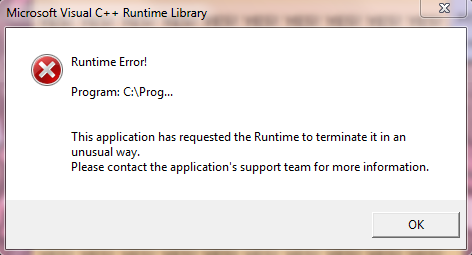
When attempting to launch the game, I briefly see what appears to be a small splash screen for the game, and then it disappears and I see this error message:


I tried looking in the game's folders but I do not see anything that looks like an error log I can post (of course, I can't upload a traceback because the game doesn't launch in the first place). Info about my computer/what I've tried-

I am running Windows 7 (latest version) on a laptop, and my native resolution is 1600x900. I have 12GB RAM, Intel i7 processor, and 1GB dedicated graphics on an ATI Radeon 5870 graphics card (I doubt it's a hardware/specs issue since it doesn't seem like a particularly demanding game but I figure it's worth mentioning). I initially installed the game on Steam, but I uninstalled it and manually installed the game without Steam instead after reading about issues with the Steam overlay in this thread, which did not solve the problem. I've also tried basic checks like restarting Steam, restarting my computer, etc. I also tried launching while holding shift, which also didn't work. I'm a bit at a loss for what to do from here, so I hope someone can help! Please let me know if you need more information than what I've posted here.

Spiky Caterpillar

Re: Troubleshooting / Bug Reports

#65 by Spiky Caterpillar - Apr 4 2014

Things to try:
If your install has the 'Play in Safe Mode' and 'Play in GL mode' batch files, try starting it through each of them.

Try quitting all other programs - in particular, we've gotten reports that Science Girls crashes when initializing sound on some machines if Skype is running when the game starts.

If either of these fixes it, your dxdiag output may be helpful.

Try reverifying files after an unsuccessful Steam startup - since the game byte-compiles some of its code on first run, the number of files replaced will hint at where the crash is happening.

Try copying the install folder somewhere other than Program Files (x86) so the game will have permission to create the logfiles - opengl.txt and MagicalDiary.exe.log, if created, are useful.

Are there any .fail files in %APPDATA%\RenPy\MagicalDiaryHorseHall\ ?

Captain Catbee

Re: Troubleshooting / Bug Reports

#66 by Captain Catbee - Apr 4 2014

After making the previous post I actually tried launching without any other programs open, which didn't work either. I also tried reverifying files while I was still trying to launch the Steam install- I was informed that there were 61 trouble files, which seems to be normal according to this thread.

I did not find any .fail files in that folder; all I see is opengl.txt. The content:

<function version at 0x035B1030>
fullscreen mode.
Do you think it might help if I change it to windowed mode? I know that my computer doesn't always like launching things in fullscreen (especially games that run in a lower resolution than my display), and because launching goes as far as displaying presplash.png it seems like it might be the switch to fullscreen that snags the process.


I also don't think I see the files for safe mode and GL mode- do you know which file names and extensions I should be looking for? In the meantime I'll try moving the folder somewhere else like you said.


*** EDIT: I was a bit annoyed with how generic the error message I was getting was (and I imagine that makes support more difficult as well), so I checked the event viewer and found a more detailed log:
Faulting application name: MagicalDiary.exe, version: 0.0.0.0, time stamp: 0x4918019c
Faulting module name: PYTHON26.DLL, version: 2.6.5150.1013, time stamp: 0x4ba3e3f1
Exception code: 0x40000015
Fault offset: 0x000553de
Faulting process id: 0x17f4
Faulting application start time: 0x01cf508eb561256f
Faulting application path: C:\Users\EllaBee\My Documents\My Games\Magical Diary - Horse Hall\MagicalDiary.exe
Faulting module path: C:\Users\EllaBee\My Documents\My Games\Magical Diary - Horse Hall\PYTHON26.DLL
Report Id: 0116a324-bc82-11e3-af1a-bcaec50e965e
**** Edit Edit: I just realized I forgot to mention I'm running 64-bit Windows, if that changes anything.

Spiky Caterpillar

Re: Troubleshooting / Bug Reports

#67 by Spiky Caterpillar - Apr 7 2014

Thanks for the error details - those tell me that the crash appears to be happening somewhere in a DLL.

The batch files are 'Play in safe mode.bat' and 'Play in GL mode.bat' in the same directory as the exe.
(And yes, windowed mode is generally more reliable)

If you don't have the batch files, try creating a new file named 'safemode.bat' in the same directory as the exe, containing the following code:

set RENPY_RENDERER=sw
set RENPY_DISABLE_FULLSCREEN=1
set RENPY_DISABLE_SOUND=pss,mix
MagicalDiary.exe
and running it. If it works, you can fix the video settings in the in-game options.

Captain Catbee

Re: Troubleshooting / Bug Reports

#68 by Captain Catbee - Apr 7 2014

That worked, thanks so much! I'm not entirely sure what all was going on with that, but if it's working now I have no complaints Smile

alinka909

Re: Troubleshooting / Bug Reports

#69 by alinka909 - Oct 16 2015

Hi! I'm having some problems. A few months ago I got a new computer and now that I have some time I decided to redownload the game. Every time I open it I get a black screen and background music. I tried troubleshooting compatibility, but that did not work.

hanako

Re: Troubleshooting / Bug Reports

#70 by hanako - Oct 16 2015

What sort of computer are you using?

Most launch problems can be addressed by holding down shift while you launch and changing the display options. For better information than that it helps to know more about your computer.

alinka909

Re: Troubleshooting / Bug Reports

#71 by alinka909 - Oct 18 2015

hanako:

What sort of computer are you using?

Most launch problems can be addressed by holding down shift while you launch and changing the display options. For better information than that it helps to know more about your computer.

ASUS ROG Series G751J

Spiky Caterpillar

Re: Troubleshooting / Bug Reports

#72 by Spiky Caterpillar - Oct 18 2015

alinka909:

hanako:

What sort of computer are you using?

Most launch problems can be addressed by holding down shift while you launch and changing the display options. For better information than that it helps to know more about your computer.

ASUS ROG Series G751J
Running Windows, I presume?

Okay, the first thing to try is going to the directory the game is installed in. There should be a file called 'opengl.txt' (or just 'opengl', if your computer is set to hide file extensions) in there; send it to me at http://spikycaterpillar.com/savegame-upload.html . (We want this first because the fixes might make it harder to tell what's going wrong.)

There will also be a pair of files named 'Play in safe mode.bat' and 'Play in GL mode.bat'. Run 'Play in safe mode', see if it works. If not, run the 'Play in GL mode' file.

Other things to try - pressing 'F' while the game is running should cause it to switch between windowed and fullscreen mode; a lot of the time a driver problem that breaks in fullscreen will be fine in windowed mode.

alinka909

Re: Troubleshooting / Bug Reports

#73 by alinka909 - Oct 21 2015

Spiky Caterpillar:

alinka909:

hanako:

What sort of computer are you using?

Most launch problems can be addressed by holding down shift while you launch and changing the display options. For better information than that it helps to know more about your computer.

ASUS ROG Series G751J
Running Windows, I presume?

Okay, the first thing to try is going to the directory the game is installed in. There should be a file called 'opengl.txt' (or just 'opengl', if your computer is set to hide file extensions) in there; send it to me at http://spikycaterpillar.com/savegame-upload.html . (We want this first because the fixes might make it harder to tell what's going wrong.)

There will also be a pair of files named 'Play in safe mode.bat' and 'Play in GL mode.bat'. Run 'Play in safe mode', see if it works. If not, run the 'Play in GL mode' file.

Other things to try - pressing 'F' while the game is running should cause it to switch between windowed and fullscreen mode; a lot of the time a driver problem that breaks in fullscreen will be fine in windowed mode.
I found the problem. It turns out that I had to switch my graphics processor from the default.

Kisu

Re: Troubleshooting / Bug Reports

#74 by Kisu - Feb 9 2016

Help...
Every time I try to play the game, it instantly crashes ^^"
I honestly don't know what I should do ._.

Here's the traceback-file:
I'm sorry, but an uncaught exception occurred.

While running game code:
  File "renpy/common/00start.rpy", line 150, in script call
    call _gl_test
  File "renpy/common/00gltest.rpy", line 378, in script
    $ __gl_test()
  File "renpy/common/00gltest.rpy", line 378, in <module>
    $ __gl_test()
  File "renpy/common/00gltest.rpy", line 304, in _m1_00gltest__gl_test
    _gl_performance_test()
  File "renpy/common/00gltest.rpy", line 343, in _gl_performance_test
    result = ui.interact(suppress_overlay=True, suppress_underlay=True)
error: Couldn't find mapping for device (0)

-- Full Traceback ------------------------------------------------------------

Full traceback:
  File "D:\Steam\steamapps\common\Magical Diary\renpy\bootstrap.py", line 301, in bootstrap
    renpy.main.main()
  File "D:\Steam\steamapps\common\Magical Diary\renpy\main.py", line 468, in main
    run(restart)
  File "D:\Steam\steamapps\common\Magical Diary\renpy\main.py", line 139, in run
    renpy.execution.run_context(True)
  File "D:\Steam\steamapps\common\Magical Diary\renpy\execution.py", line 714, in run_context
    context.run()
  File "renpy/common/00start.rpy", line 150, in script call
    call _gl_test
  File "renpy/common/00gltest.rpy", line 378, in script
    $ __gl_test()
  File "D:\Steam\steamapps\common\Magical Diary\renpy\ast.py", line 805, in execute
    renpy.python.py_exec_bytecode(self.code.bytecode, self.hide, store=self.store)
  File "D:\Steam\steamapps\common\Magical Diary\renpy\python.py", line 1461, in py_exec_bytecode
    exec bytecode in globals, locals
  File "renpy/common/00gltest.rpy", line 378, in <module>
    $ __gl_test()
  File "renpy/common/00gltest.rpy", line 304, in _m1_00gltest__gl_test
    _gl_performance_test()
  File "renpy/common/00gltest.rpy", line 343, in _gl_performance_test
    result = ui.interact(suppress_overlay=True, suppress_underlay=True)
  File "D:\Steam\steamapps\common\Magical Diary\renpy\ui.py", line 277, in interact
    rv = renpy.game.interface.interact(roll_forward=roll_forward, **kwargs)
  File "D:\Steam\steamapps\common\Magical Diary\renpy\display\core.py", line 2427, in interact
    repeat, rv = self.interact_core(preloads=preloads, **kwargs)
  File "D:\Steam\steamapps\common\Magical Diary\renpy\display\core.py", line 3065, in interact_core
    ev = renpy.display.controller.event(ev)
  File "D:\Steam\steamapps\common\Magical Diary\renpy\display\controller.py", line 133, in event
    start(ev.which)
  File "D:\Steam\steamapps\common\Magical Diary\renpy\display\controller.py", line 124, in start
    c.init()
  File "pygame_sdl2/controller.pyx", line 160, in pygame_sdl2.controller.Controller.init (gen\pygame_sdl2.controller.c:1871)
error: Couldn't find mapping for device (0)

Windows-Vista-6.0.6002-SP2
Ren'Py 6.99.8.959+SPIKY
 
Game: MagicalDiary-1.1.4
Renderer: gl 1024x768
OS: Windows Vista 6.0.6002 x86 x86 Family 6 Model 15 Stepping 13, GenuineIntel
Vendor: Steam
Any idea what I could do to fix this? ^^" Please?

hanako

Re: Troubleshooting / Bug Reports

#75 by hanako - Feb 9 2016

quick questions - do you have a controller plugged in, and does the message change if you disconnect it? Does starting the game with the Safe Mode shortcut work any better?

Since this appears to be a Steam version you may wish to consult the troubleshooting thread here: http://steamcommunity.com/app/211340/discussions/0/496880203075889296/ where other users as well as Spiky and I can contribute.

Kisu

Re: Troubleshooting / Bug Reports

#76 by Kisu - Feb 9 2016

I had a controller plugged in (old PS2 controller), but neither disconnecting, nor the safe mode fixes the issue, unfortunately.

Just to be in the safe side, the latest traeback:
I'm sorry, but an uncaught exception occurred.

While running game code:
  File "renpy/common/00start.rpy", line 150, in script call
    call _gl_test
  File "renpy/common/00gltest.rpy", line 378, in script
    $ __gl_test()
  File "renpy/common/00gltest.rpy", line 378, in <module>
    $ __gl_test()
  File "renpy/common/00gltest.rpy", line 304, in _m1_00gltest__gl_test
    _gl_performance_test()
  File "renpy/common/00gltest.rpy", line 343, in _gl_performance_test
    result = ui.interact(suppress_overlay=True, suppress_underlay=True)
error: Couldn't find mapping for device (0)

-- Full Traceback ------------------------------------------------------------

Full traceback:
  File "D:\Steam\steamapps\common\Magical Diary\renpy\bootstrap.py", line 301, in bootstrap
    renpy.main.main()
  File "D:\Steam\steamapps\common\Magical Diary\renpy\main.py", line 468, in main
    run(restart)
  File "D:\Steam\steamapps\common\Magical Diary\renpy\main.py", line 139, in run
    renpy.execution.run_context(True)
  File "D:\Steam\steamapps\common\Magical Diary\renpy\execution.py", line 714, in run_context
    context.run()
  File "renpy/common/00start.rpy", line 150, in script call
    call _gl_test
  File "renpy/common/00gltest.rpy", line 378, in script
    $ __gl_test()
  File "D:\Steam\steamapps\common\Magical Diary\renpy\ast.py", line 805, in execute
    renpy.python.py_exec_bytecode(self.code.bytecode, self.hide, store=self.store)
  File "D:\Steam\steamapps\common\Magical Diary\renpy\python.py", line 1461, in py_exec_bytecode
    exec bytecode in globals, locals
  File "renpy/common/00gltest.rpy", line 378, in <module>
    $ __gl_test()
  File "renpy/common/00gltest.rpy", line 304, in _m1_00gltest__gl_test
    _gl_performance_test()
  File "renpy/common/00gltest.rpy", line 343, in _gl_performance_test
    result = ui.interact(suppress_overlay=True, suppress_underlay=True)
  File "D:\Steam\steamapps\common\Magical Diary\renpy\ui.py", line 277, in interact
    rv = renpy.game.interface.interact(roll_forward=roll_forward, **kwargs)
  File "D:\Steam\steamapps\common\Magical Diary\renpy\display\core.py", line 2427, in interact
    repeat, rv = self.interact_core(preloads=preloads, **kwargs)
  File "D:\Steam\steamapps\common\Magical Diary\renpy\display\core.py", line 3065, in interact_core
    ev = renpy.display.controller.event(ev)
  File "D:\Steam\steamapps\common\Magical Diary\renpy\display\controller.py", line 133, in event
    start(ev.which)
  File "D:\Steam\steamapps\common\Magical Diary\renpy\display\controller.py", line 124, in start
    c.init()
  File "pygame_sdl2/controller.pyx", line 160, in pygame_sdl2.controller.Controller.init (gen\pygame_sdl2.controller.c:1871)
error: Couldn't find mapping for device (0)

Windows-Vista-6.0.6002-SP2
Ren'Py 6.99.8.959+SPIKY
 
Game: MagicalDiary-1.1.4
Renderer: sw 1024x768
OS: Windows Vista 6.0.6002 x86 x86 Family 6 Model 15 Stepping 13, GenuineIntel
Vendor: Steam
And I'll switch to steam then ^^

hanako

Re: Troubleshooting / Bug Reports

#77 by hanako - Feb 9 2016

We'll keep looking for answers! Unfortunately Spiky is on vacation right now so we may be a little more clueless than usual but I'll see if we can find some better suggestions for you Smile

Kisu

Re: Troubleshooting / Bug Reports

#78 by Kisu - Feb 9 2016

Don't worry, I'll be patient ^^
For now I'll try to make this screenshot of the traceback-file visible on Steam, so some of the other players might be able to help.

norzunico

Re: Troubleshooting / Bug Reports

#79 by norzunico - Mar 25 2016

hi i just downloaded the demo of this game from steam today. wanted to try it fist instead of straight away buying it. however, the game started but the screen was black. when i randomly click, noting happened. i have the latest version of directX. are there more requirement for this game? currently running on windows 10 with i3 processor. pls help me. thx

hanako

Re: Troubleshooting / Bug Reports

#80 by hanako - Mar 25 2016

I can't remember if the Steam demo is up to date or not. Have you tried the demo version available from the hanakogames website?

Black screen errors are generally graphics card related. There are some troubleshooting tips available at http://steamcommunity.com/app/211340/discussions/0/496880203075889296/

PumpkinSmiley

Re: Troubleshooting / Bug Reports

#81 by PumpkinSmiley - Jun 7 2017

I have a sound issue that I cannot seem to fix by myself.
Yesterday I tried to play the game for the first time in years. So far everything works - except for the sound.
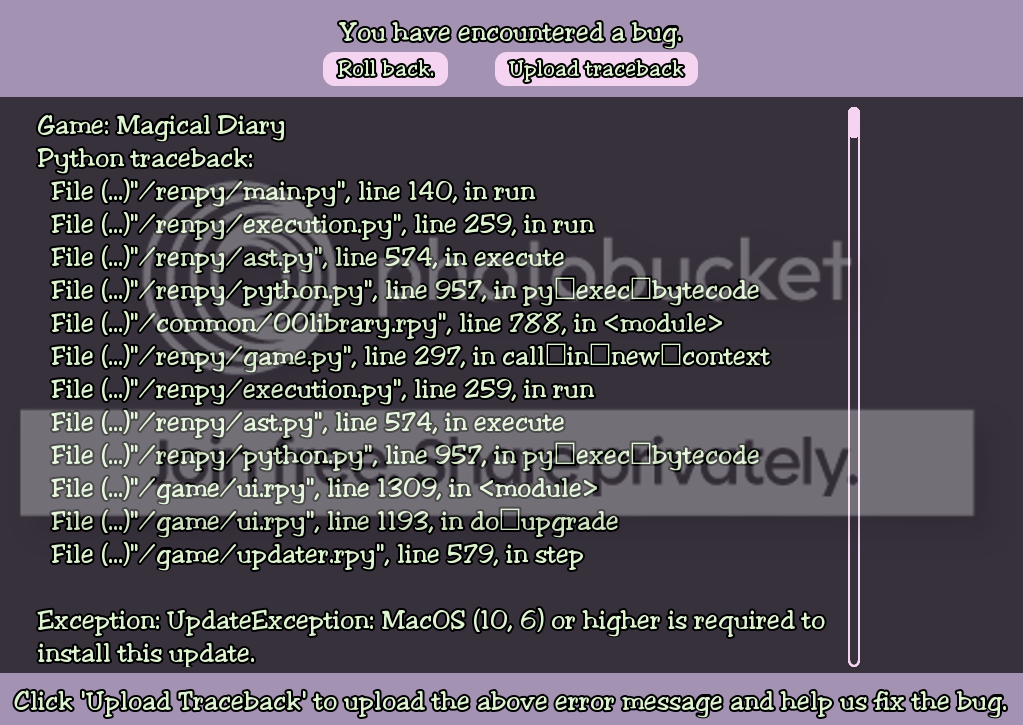
I tried updating from version 1.0.32 to version 1.0.42. When I try further updating, I hit a bug.
I'm playing on Mac (Sierra 10.12.1).
I've posted screenshots below. I get the blank page if I try to copy or scroll on the bug-description.

What can I do to fix it? I really miss the soundtracks!
Thanks in advance!


hanako

Re: Troubleshooting / Bug Reports

#82 by hanako - Jun 8 2017

Does the current demo version play sound for you?

If so the simplest thing might be for us to just skip over the updating and get you a more recent installer, or to try upgrading from the demo.

Spiky Caterpillar

Re: Troubleshooting / Bug Reports

#83 by Spiky Caterpillar - Jun 9 2017

PumpkinSmiley:

I tried updating from version 1.0.32 to version 1.0.42. When I try further updating, I hit a bug.
I'm playing on Mac (Sierra 10.12.1).
I've posted screenshots below. I get the blank page if I try to copy or scroll on the bug-description.

What can I do to fix it? I really miss the soundtracks!
Hm. It looks like I'm not correctly parsing the OS version so it thinks 10.12.1 is older than 10.6. What do you get if you go to the updater screen, click the 'Python Console' button, and enter the following code?
narrator(repr(platform.mac_ver()))
(Enter a blank line to run the code; the _ may show up as a square onscreen)

PumpkinSmiley

Re: Troubleshooting / Bug Reports

#84 by PumpkinSmiley - Jun 13 2017

hanako:

Does the current demo version play sound for you?
If so the simplest thing might be for us to just skip over the updating and get you a more recent installer, or to try upgrading from the demo.
As far as I can tell, yes, it works in the demo. Very Happy

PumpkinSmiley

Re: Troubleshooting / Bug Reports

#85 by PumpkinSmiley - Jun 13 2017

Spiky Caterpillar:

Hm. It looks like I'm not correctly parsing the OS version so it thinks 10.12.1 is older than 10.6. What do you get if you go to the updater screen, click the 'Python Console' button, and enter the following code?
narrator(repr(platform.mac_ver()))
(Enter a blank line to run the code; the _ may show up as a square onscreen)
I get this result:
('10',(",","),'RenPy')

hanako

Re: Troubleshooting / Bug Reports

#86 by hanako - Jun 15 2017

PumpkinSmiley:

hanako:

Does the current demo version play sound for you?
If so the simplest thing might be for us to just skip over the updating and get you a more recent installer, or to try upgrading from the demo.
As far as I can tell, yes, it works in the demo. Very Happy
Well that's a start! Smile

I've sent a fresh download email which hopefully you should receive, which should let you get a more recent installer.

PumpkinSmiley

Re: Troubleshooting / Bug Reports

#87 by PumpkinSmiley - Jun 17 2017

hanako:

PumpkinSmiley:

hanako:

Does the current demo version play sound for you?
If so the simplest thing might be for us to just skip over the updating and get you a more recent installer, or to try upgrading from the demo.
As far as I can tell, yes, it works in the demo. Very Happy
Well that's a start! Smile
I've sent a fresh download email which hopefully you should receive, which should let you get a more recent installer.
Thank you! Can I possibly convince you to send it again? I know I received it the first time because I opened it on my phone, but now I can't find it anywhere. Confused

Ariel Schnee

Re: Troubleshooting / Bug Reports

#88 by Ariel Schnee - Nov 23 2017

I just installed InstallMagicalDiary1.1.4.exe and kept this error every time I try to start the game.
I'm sorry, but an uncaught exception occurred.

While running game code:
  File "renpy/common/00start.rpy", line 150, in script call
    call _gl_test
  File "renpy/common/00gltest.rpy", line 378, in script
    $ __gl_test()
  File "renpy/common/00gltest.rpy", line 378, in <module>
    $ __gl_test()
  File "renpy/common/00gltest.rpy", line 304, in _m1_00gltest__gl_test
    _gl_performance_test()
  File "renpy/common/00gltest.rpy", line 343, in _gl_performance_test
    result = ui.interact(suppress_overlay=True, suppress_underlay=True)
error: Couldn't find mapping for device (0)

-- Full Traceback ------------------------------------------------------------

Full traceback:
  File "C:\Program Files\Magical Diary - Horse Hall\renpy\bootstrap.py", line 301, in bootstrap
    renpy.main.main()
  File "C:\Program Files\Magical Diary - Horse Hall\renpy\main.py", line 468, in main
    run(restart)
  File "C:\Program Files\Magical Diary - Horse Hall\renpy\main.py", line 139, in run
    renpy.execution.run_context(True)
  File "C:\Program Files\Magical Diary - Horse Hall\renpy\execution.py", line 714, in run_context
    context.run()
  File "renpy/common/00start.rpy", line 150, in script call
    call _gl_test
  File "renpy/common/00gltest.rpy", line 378, in script
    $ __gl_test()
  File "C:\Program Files\Magical Diary - Horse Hall\renpy\ast.py", line 805, in execute
    renpy.python.py_exec_bytecode(self.code.bytecode, self.hide, store=self.store)
  File "C:\Program Files\Magical Diary - Horse Hall\renpy\python.py", line 1461, in py_exec_bytecode
    exec bytecode in globals, locals
  File "renpy/common/00gltest.rpy", line 378, in <module>
    $ __gl_test()
  File "renpy/common/00gltest.rpy", line 304, in _m1_00gltest__gl_test
    _gl_performance_test()
  File "renpy/common/00gltest.rpy", line 343, in _gl_performance_test
    result = ui.interact(suppress_overlay=True, suppress_underlay=True)
  File "C:\Program Files\Magical Diary - Horse Hall\renpy\ui.py", line 277, in interact
    rv = renpy.game.interface.interact(roll_forward=roll_forward, **kwargs)
  File "C:\Program Files\Magical Diary - Horse Hall\renpy\display\core.py", line 2427, in interact
    repeat, rv = self.interact_core(preloads=preloads, **kwargs)
  File "C:\Program Files\Magical Diary - Horse Hall\renpy\display\core.py", line 3065, in interact_core
    ev = renpy.display.controller.event(ev)
  File "C:\Program Files\Magical Diary - Horse Hall\renpy\display\controller.py", line 133, in event
    start(ev.which)
  File "C:\Program Files\Magical Diary - Horse Hall\renpy\display\controller.py", line 124, in start
    c.init()
  File "pygame_sdl2/controller.pyx", line 160, in pygame_sdl2.controller.Controller.init (gen\pygame_sdl2.controller.c:1871)
error: Couldn't find mapping for device (0)

Windows-XP-5.1.2600-SP3
Ren'Py 6.99.8.959+SPIKY
 
Game: MagicalDiary-1.1.4
Renderer: angle 1024x768
OS: Windows XP 5.1.2600 x86 x86 Family 6 Model 23 Stepping 10, GenuineIntel

Please help.

Thanks.
---

(Dead link removed)

hanako

Re: Troubleshooting / Bug Reports

#89 by hanako - Nov 23 2017

I know you were having trouble upgrading earler - did you completely remove the old version before installing a new one?

Ariel Schnee

Re: Troubleshooting / Bug Reports

#90 by Ariel Schnee - Nov 23 2017

hanako:

I know you were having trouble upgrading earler - did you completely remove the old version before installing a new one?
Yes. I even removed everything from Application Data/RenPy/Magical Diary as well. I even checked to see if there was anything in Local Settings/Application Data and there wasn't anything.
---

(Dead link removed)

Spiky Caterpillar

Re: Troubleshooting / Bug Reports

#91 by Spiky Caterpillar - Nov 24 2017

Ariel Schnee:

I just installed InstallMagicalDiary1.1.4.exe and kept this error every time I try to start the game.
I'm sorry, but an uncaught exception occurred.
...
  File "C:\Program Files\Magical Diary - Horse Hall\renpy\display\controller.py", line 133, in event
    start(ev.which)
  File "C:\Program Files\Magical Diary - Horse Hall\renpy\display\controller.py", line 124, in start
    c.init()
  File "pygame_sdl2/controller.pyx", line 160, in pygame_sdl2.controller.Controller.init (gen\pygame_sdl2.controller.c:1871)
error: Couldn't find mapping for device (0)
Please help.

Thanks.
That crash occurs when the game fails to initialize a game controller (possibly it's a new type that's not supported by the engine?).
Try unplugging all game controllers, joysticks, xbox controllers, and the like and seeing if the game starts.

If that does fix it, what type of controller is it?

Pixelen

Re: Troubleshooting / Bug Reports

#92 by Pixelen - Nov 21 2018

Hey, playing version 1.1.5.1 through Steam, and when you go to visit Grabby on April 12, both the sad music and the lighter music is playing at the same time.
Hanako forum archive - Topic list