Hanako Games

News, Walkthroughs, and Chat about Anime Games

Seeking Science Explorers for Steam beta


hanako

Seeking Science Explorers for Steam beta

#1 by hanako - Mar 4 2014

If you have purchased and played Science Girls prior to March 2014 and are interested in beta-testing the new version on Steam, please email me with your receipt (or enough information about your order that I can find it in the records) so I can give out a shiny Steam beta key.

We want to get this ready for release soon, so please come and give us some feedback!

Please do not buy a copy of the game now just so you can get a Steam test key. If you don't have a copy yet, WAIT. Smile

wendymarlowe

Re: Seeking Science Explorers for Steam beta

#2 by wendymarlowe - Mar 5 2014

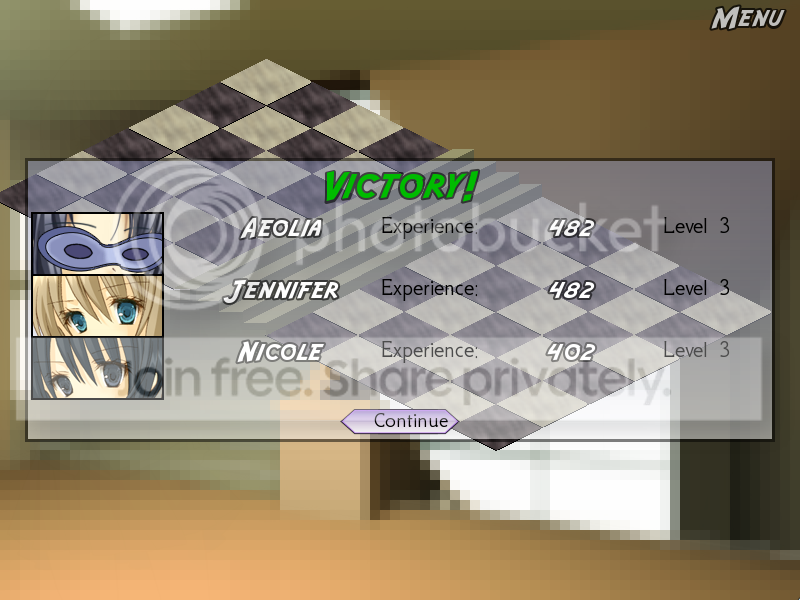
Don't know whether this is intentional or not - I haven't compared it to the previous non-Steam copy of the game - but poor Nicole seems to keep getting the shaft, xp-wise:


I assumed it had something to do with her getting fewer hits in or something, but it's been every fight since I picked her up (granted, I'm still not that far in yet).

hanako

Re: Seeking Science Explorers for Steam beta

#3 by hanako - Mar 5 2014

Not a change - party members on joining have their own starting XP which is not the same as the people who've been in your party up until that point, so getting the same XP as everyone else will still leave her at a slightly different total.

wendymarlowe

Re: Seeking Science Explorers for Steam beta

#4 by wendymarlowe - Mar 5 2014

Ah, okay, that explains it. I was reading the numbers as "XP gained this fight" - your way makes a lot more sense Razz

wendymarlowe

Re: Seeking Science Explorers for Steam beta

#5 by wendymarlowe - Mar 5 2014

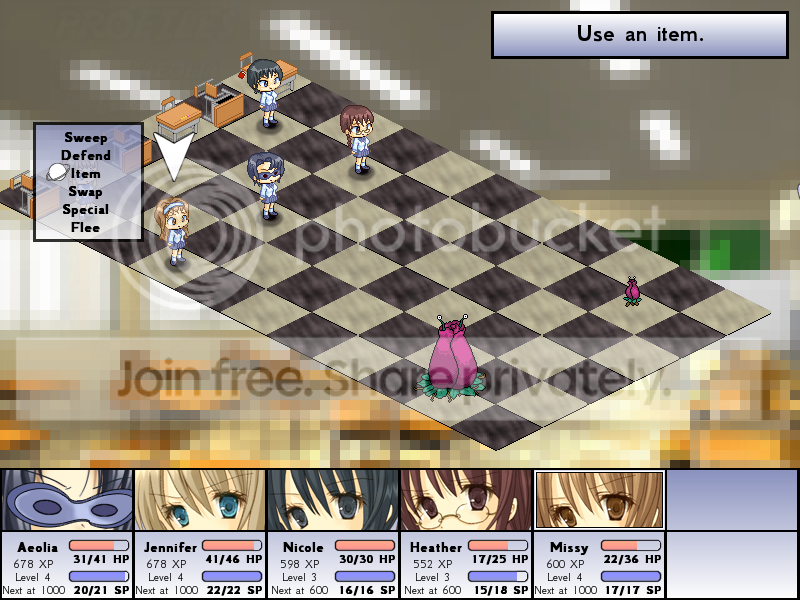
A request for next time you do a biggish update: would it be possible to add the girls' names to the top of the window where we pick their actions each turn? (This was something I would have liked on my last playthrough, too.) I get to screens like this:


and I have to double-check the girls' hair color against their pictures at the bottom to make sure I'm not about to have someone do an attack when they really need to heal (or waste a heal when they should be attacking). It's not insurmountable, and I'm sure it gets easier as the game goes on and I'll get more used to pairing the pictures and the names and the HP bars, but it's something to think about if it wouldn't be too much extra bother.

ETA: I only tonight noticed the white border around the selected girl. D'oh! (And I have played a good way through the game before, too!)

phoenixgirl

Re: Seeking Science Explorers for Steam beta

#6 by phoenixgirl - Mar 6 2014

I'm not sure how much time I'll have to beta test although I'll do my best to get some time in. XD

I'm not sure if this is a bug but I found this a bit unusual:

[Could not load http://i146.photobucket.com/albums/r263/phoenix_prof/KillerPlant_zps8897490b.png]

I think that killer plant wasn't there in the previous version? It's been a while since I last played so I could be quite wrong about this.
Please help and support me here.

phoenixgirl

Re: Seeking Science Explorers for Steam beta

#7 by phoenixgirl - Mar 8 2014

I finished through the game earlier today. It really has been quite a while since I last played so I forgot some things. lol

I looked at the achievements page and I got 4 out of the 7. I'm wondering how to get the following missing ones:

Board of Regents
Thesis Defense
Hairy Ball Theorem


I'm pretty thorough when it comes to exploring all areas of a game so I'm wondering if I missed something somewhere. XD
Please help and support me here.

hanako

Re: Seeking Science Explorers for Steam beta

#8 by hanako - Mar 8 2014

One of those has to do with an easily-missable map location

One requires playing at the highest difficulty

One requires using scientific principles to kill monsters with items in an unusual way.

(vague hintiness)

wendymarlowe

Re: Seeking Science Explorers for Steam beta

#9 by wendymarlowe - Mar 9 2014

Woo, a genuine bug!


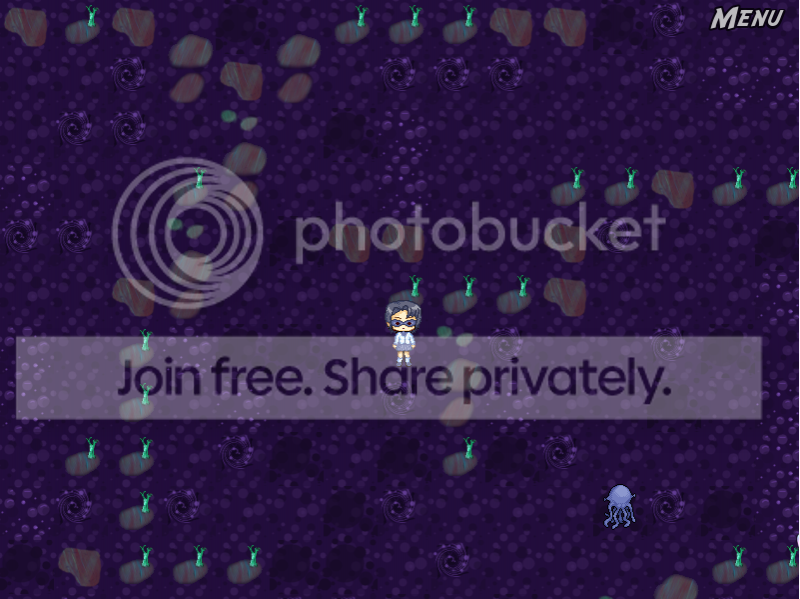
Just finished a fight in the swampy area, which started when I was on the path and the monster (one of those inky octopus things) was not. I get back to the map and my character is standing next to the path where the monster was, unable to move in any direction. (Have to go back to a previous save.)

Spiky Caterpillar

Re: Seeking Science Explorers for Steam beta

#10 by Spiky Caterpillar - Mar 9 2014

The getting-stuck-in-the-swamp bug should be fixed in 1.3.1, but it'll still show up in saves where you first entered the swamp level on 1.3 or earlier.

wendymarlowe

Re: Seeking Science Explorers for Steam beta

#11 by wendymarlowe - Mar 12 2014

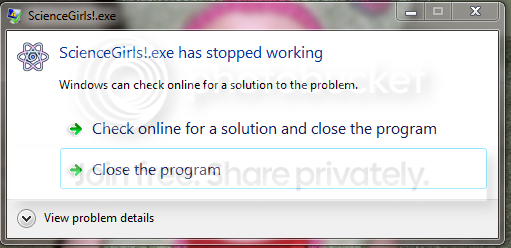
Now I can't get into the game at all - attempting to open it (through the desktop shortcut or via Steam) just gives me a Windows error saying "ScienceGirls!.exe has stopped working." Both Steam and Java updated something since yesterday (when I last played).

Spiky Caterpillar

Re: Seeking Science Explorers for Steam beta

#12 by Spiky Caterpillar - Mar 12 2014

Does the error message provide any additional information? What version of Windows are you using? If you start the game directly from Windows rather than the desktop shortcut, does it work? Does unchecking the 'Enable Steam Overlay In Game' box make it work?

(Java updates should have no effect on it; Steam updates can have an effect, though it's working on my machine.)

wendymarlowe

Re: Seeking Science Explorers for Steam beta

#13 by wendymarlowe - Mar 12 2014

No additional information, just thegeneric message:


I'm running Windows 7, and booting the game from the start menu, desktop shortcut, and Steam library page all give the same error. I found the "Enable Steam Overlay" box and tried it both checked and unchecked with all three boot variations; still no luck.

Spiky Caterpillar

Re: Seeking Science Explorers for Steam beta

#14 by Spiky Caterpillar - Mar 12 2014

Can you expand 'View problem details'? Does reverifying the downloaded files help?

wendymarlowe

Re: Seeking Science Explorers for Steam beta

#15 by wendymarlowe - Mar 12 2014

"View problem details" yields

Problem signature:
Problem Event Name: APPCRASH
Application Name: ScienceGirls!.exe
Application Version: 0.0.0.0
Application Timestamp: 4917df95
Fault Module Name: StackHash_c51c
Fault Module Version: 0.0.0.0
Fault Module Timestamp: 00000000
Exception Code: c0000005
Exception Offset: 956c0000
OS Version: 6.1.7601.2.1.0.768.3
Locale ID: 1033
Additional Information 1: c51c
Additional Information 2: c51c3a7990f8a4215c04d38604988dcf
Additional Information 3: 2ff6
Additional Information 4: 2ff67d422fb675aeed69f09799e8be35

Read our privacy statement online:
http://go.microsoft.com/fwlink/?linkid=104288&clcid=0x0409

If the online privacy statement is not available, please read our privacy statement offline:
C:\Windows\system32\en-US\erofflps.txt

Not sure what you mean by reverifying the downloaded files - what would I need to do for that?

Spiky Caterpillar

Re: Seeking Science Explorers for Steam beta

#16 by Spiky Caterpillar - Mar 13 2014

To verify the download cache:
Right-click on the game. Select 'Properties'. Go to the 'Local Files' tab. Click 'Verify integrity of game cache'. It's normal for it to report about 50 files need redownloading since you ran it successfully.

c0000005 is an access violation, which usually indicates a memory allocation bug of some sort - however, I'm not sure why there'd be one.

If verifying/redownloading doesn't fix the problem, other things to try:

Click 'Browse local files' and post the contents of ScienceGirls!.exe.log if it exists.
Deleting C:\Users\(your username)\AppData\Roaming\RenPy\science_girls\persistent will clear your settings, which might work around the bug if it's a driver problem.
Deleting game\steamsh.exe (in the Steam install folder for Science Girls) will keep it from loading the Steam API (so if that fixes it, then there's probably a bug in my steamsh that I need to fix)

Verify/redownload a second time and tell me how many files it says are changed (as that will tell me something about how far it's getting before crashing.)

wendymarlowe

Re: Seeking Science Explorers for Steam beta

#17 by wendymarlowe - Mar 13 2014

"51 files failed to validate and will be reacquired." Allowed them to load, closed and re-launched steam, got the same failure message. Tried verifying again immediately and got 41 files failing to validate this time (and the next).

No ScienceGirls!.exe.log file there, as far as I can tell.

Deleting C:\Users\(your username)\AppData\Roaming\RenPy\science_girls\persistent didn't seem to make any difference in letting me launch the game - I checked via shortcut, start menu, and Steam library menu.

Deleted game/steamsh.exe --> still won't start from any of the three methods.

Verifying/redownloading gives 42 files. (And still won't let me open the game.)

Spiky Caterpillar

Re: Seeking Science Explorers for Steam beta

#18 by Spiky Caterpillar - Mar 13 2014

What happens when you bring up the game install folder (through 'Browse local files'), quit the Steam client entirely, and start the game from the install folder directly? Do you have any virus scanners or other apps that modify running programs? Does turning them off make a difference? What colour depth is your screen set to? Is sound working? Are any other programs showing similar crashes? Have you changed any hardware?

Regrettably, I'm rather lost on this one Sad I can understand bugs where things *never* work, but crashes when it used to work tend to be complex and hard to debug.

wendymarlowe

Re: Seeking Science Explorers for Steam beta

#19 by wendymarlowe - Mar 13 2014

Spiky Caterpillar:

What happens when you bring up the game install folder (through 'Browse local files'), quit the Steam client entirely, and start the game from the install folder directly?
Same error message.

Spiky Caterpillar:

Do you have any virus scanners or other apps that modify running programs? Does turning them off make a difference?
No virus scanners and nothing I can think of that would modify running programs - I tend to work off the "keep it streamlined, back up the important stuff, and rebuild from scratch every once in a blue moon if things go south" philosophy Razz

Spiky Caterpillar:

What colour depth is your screen set to? Is sound working? Are any other programs showing similar crashes? Have you changed any hardware?
Unfortunately, I can't make heads or tails of Windows 7's menus when it comes to things that should be simple like "How many colors does my monitor have?" - pretty sure it's "lots, and the same as I had before." Sound is working fine for other things (movies/internet/Minecraft) and although I had issues with Minecraft earlier today, I'm pretty sure it was on their end and the issue resolved quickly. Other Steam games run fine, and I haven't changed any hardware. The only real changes I can point to are the Java and the Steam updates.

Spiky Caterpillar:

Regrettably, I'm rather lost on this one Sad I can understand bugs where things *never* work, but crashes when it used to work tend to be complex and hard to debug.

phoenixgirl

Re: Seeking Science Explorers for Steam beta

#20 by phoenixgirl - Mar 13 2014

I haven't had this problem on my end but I can suggest a couple of things to try whenever I've had certain programs not work for me in the past. If it's a Java issue, perhaps try disabling it? I disable Java myself. Or if there isn't another solution, perhaps you could run a system restore? Go back to a point before the problem occurred?
Please help and support me here.

hanako

Re: Seeking Science Explorers for Steam beta

#21 by hanako - Mar 13 2014

I can't see any reasonable way disabling Java would have an effect since the game doesn't use Java. (But sometimes computers aren't reasonable.) If Java messed something up in the Windows configurations when it was updating that might break other things but disabling Java probably wouldn't un-break them. Dunno.

One thing that might be interesting to look at - do you still have the previous version of the game on your computer somewhere? The non-steam one? If THAT no longer runs either then it would suggest the issue being something that had updated on the computer.

wendymarlowe

Re: Seeking Science Explorers for Steam beta

#22 by wendymarlowe - Mar 13 2014

Hmmm - yes, I do still have the other one, and it gives the same error message. (LLTQ and The Royal Trap both work fine, though, as do other Steam games - seems like the problem is restricted to Science Girls.)

Problem signature:
Problem Event Name: APPCRASH
Application Name: ScienceGirls!.exe
Application Version: 0.0.0.0
Application Timestamp: 4917df95
Fault Module Name: StackHash_c51c
Fault Module Version: 0.0.0.0
Fault Module Timestamp: 00000000
Exception Code: c0000005
Exception Offset: 94ae0000
OS Version: 6.1.7601.2.1.0.768.3
Locale ID: 1033
Additional Information 1: c51c
Additional Information 2: c51c3a7990f8a4215c04d38604988dcf
Additional Information 3: 2ff6
Additional Information 4: 2ff67d422fb675aeed69f09799e8be35

wendymarlowe

Re: Seeking Science Explorers for Steam beta

#23 by wendymarlowe - Mar 16 2014

Steam updated something today (~5 seconds, maybe?) and now the game works. So I have no idea what happened.

wendymarlowe

Re: Seeking Science Explorers for Steam beta

#24 by wendymarlowe - Mar 16 2014

Not a game-breaking glitch, but I just beat found a bunch of alien seeds in a hole (guarded by a turnip thingy in an underground maze, hope you know what I'm talking about) and the game minimized itself for no particular reason. It opened again just fine to where it left off, but odd.

ETA: Did it again when I got the "pomelo" achievement.

wendymarlowe

Re: Seeking Science Explorers for Steam beta

#25 by wendymarlowe - Mar 17 2014

Gah - it was working fine yesterday! I got the text popup when I quit (which I emailed you), immediately reloaded my save and quit again without getting the text popup, then when I tried to start the game today it gave me the same error message I posted upthread Sad

_SE_

Re: Seeking Science Explorers for Steam beta

#26 by _SE_ - Mar 17 2014

A couple of small bugs- a few times today I noticed Spiked Balls listed as Stealth Balls when I selected them after they were decloaked. Also, when I quit the game it gave me this traceback.

I'm sorry, but an exception occured while executing your Ren'Py
script.

Exception: Render count is 9 at shutdown. This probably indicates a memory leak bug in Ren'Py.

While running game code:

-- Full Traceback ------------------------------------------------------------

  File "C:\Program Files (x86)\Steam\steamapps\common\ScienceGirls\renpy\bootstrap.py", line 255, in bootstrap
  File "C:\Program Files (x86)\Steam\steamapps\common\ScienceGirls\renpy\main.py", line 320, in main
  File "C:\Program Files (x86)\Steam\steamapps\common\ScienceGirls\renpy\display\render.py", line 100, in check_at_shutdown
Exception: Render count is 9 at shutdown. This probably indicates a memory leak bug in Ren'Py.

While running game code:

Ren'Py Version: Ren'Py 6.9.2a
Game version: ScienceGirls!-1.3.3

Spiky Caterpillar

Re: Seeking Science Explorers for Steam beta

#27 by Spiky Caterpillar - Mar 18 2014

_SE_, Wendy - the game should have created a leaks.debug file and a group of files named renderleak.(number).png in the save directory. Can you zip them up and upload them to me at http://spikycaterpillar.com/savegame-upload.html ? (And also send let me know when you've uploaded, since the script doesn't currently auto-notify me - I should fix that sometime)

Wendy - the minimization looks like a bug in the achievement unlock helper; are you playing in fullscreen or windowed mode? Do the achievements show up in Steam or only in the game? Still the same Win7 machine, I assume?

hanako

Re: Seeking Science Explorers for Steam beta

#28 by hanako - Mar 18 2014

Note that it's difficult to view achievements on Steam for a game that's not officially released, so if you can't get the achievement viewer on steam's side to work properly that's probably normal. However, you should be able to see at least the most recent unlocked graphic by the entry in your library.

wendymarlowe

Re: Seeking Science Explorers for Steam beta

#29 by wendymarlowe - Mar 18 2014

I've only gotten the one achievement so far (and had the minimization bug more than once), but the achievement that did show up was in the Steam pop-up menu (over the desktop). I'm playing in fullscreen mode.

I can't find any leaks.debug file, but I'm uploading the renderleak pngs now.

ETA: Ooh, actually, Steam says I've unlocked two achievements, but it won't let me see what the other one is Razz Was there one early in the game?

hanako

Re: Seeking Science Explorers for Steam beta

#30 by hanako - Mar 18 2014

The seeds are also an achievement.

_SE_

Re: Seeking Science Explorers for Steam beta

#31 by _SE_ - Mar 18 2014

I couldn't find leaks.debug either, but I've uploaded the others.

wendymarlowe

Re: Seeking Science Explorers for Steam beta

#32 by wendymarlowe - Mar 18 2014

Aaaaaand . . . it's running fine again today. I have done literally nothing differently, but some mornings I can turn on the game just fine and others it gives me the error messages every time I try.

Maybe it only works on even-numbered days?

hanako

Re: Seeking Science Explorers for Steam beta

#33 by hanako - Mar 18 2014

My offhand guess with erratic behavior like that would be that there's something on your computer that is creating a conflict, and some days you've run the conflicting program beforehand and other times you haven't.

If that were the case then the game would be more likely to run correctly if it was one of the first things you did after booting up.

It's really a total guess, though. I'm sorry I can't be more helpful!

wendymarlowe

Re: Seeking Science Explorers for Steam beta

#34 by wendymarlowe - Mar 18 2014

That's the thing, though - I've been running it pretty much first thing (well, email THEN running it), just to see. I'm going to keep trying to run it randomly through out the day and keep some notes - even if it's not the fault of the game, someone else may end up having similar issues down the line and it would be good to know why *this game* and nothing else . . .

phoenixgirl

Re: Seeking Science Explorers for Steam beta

#35 by phoenixgirl - Mar 19 2014

So I'm going to try to get the Hairy Ball Theorem achievement and I think this has to do with killing monsters with items in an unusual way but I'm genuinely baffled as to how to get this. I've tried using both the diet soda cans and vinegar items to attack the monsters as well as using Missy's data analysis special attack but yet even the combination of the three doesn't get me the achievement. Can only killing certain monsters get this achievement or is there something I'm missing? Confused
Please help and support me here.

_SE_

Re: Seeking Science Explorers for Steam beta

#36 by _SE_ - Mar 19 2014

phoenixgirl if I recall, this achievement is triggered by finding a certain map location.

wendymarlowe

Re: Seeking Science Explorers for Steam beta

#37 by wendymarlowe - Mar 19 2014

Okay, tonight's experiment (see, I can science too!):

1) Opened game after using my computer all day. Success.

2) Rebooted computer, immediately opened game (once computer's "thinking noises" stopped). Failure message. Waited a minute - another failure message.

3) Rebooted again, opened Chrome, opened Steam, then opened game from there. Success.

4) Rebooted again, waited a full two minutes, then opened the game from the desktop. Success. Tried again a minute later - also success.

So I have no idea what that means, other than that something in Steam is slow to load, I guess? Each time, Steam shows the brief verification progress bar (<5 sec), but that doesn't seem to be different for the successes versus failures.

phoenixgirl

Re: Seeking Science Explorers for Steam beta

#38 by phoenixgirl - Mar 19 2014

_SE_:

phoenixgirl if I recall, this achievement is triggered by finding a certain map location.
Ok, so maybe I have the wrong achievement. It could be the Board of Regents but the same question still applies. I'm really having trouble getting the achievement where I have to kill monsters in a scientific way using items and I can't think of anything else that'll get this for me. :/
Please help and support me here.

Ren

Re: Seeking Science Explorers for Steam beta

#39 by Ren - Mar 19 2014

wendymarlowe:

"View problem details" yields

Problem signature:
Problem Event Name: APPCRASH
Application Name: ScienceGirls!.exe
Application Version: 0.0.0.0
Application Timestamp: 4917df95
Fault Module Name: StackHash_c51c
Fault Module Version: 0.0.0.0
Fault Module Timestamp: 00000000
Exception Code: c0000005
Exception Offset: 956c0000
OS Version: 6.1.7601.2.1.0.768.3
Locale ID: 1033
Additional Information 1: c51c
Additional Information 2: c51c3a7990f8a4215c04d38604988dcf
Additional Information 3: 2ff6
Additional Information 4: 2ff67d422fb675aeed69f09799e8be35
Getting the same problem, though my numbers are a bit different and I can't find either of the files Spiky Caterpillar was asking for.
Problem signature:
  Problem Event Name:	APPCRASH
  Application Name:	ScienceGirls!-Demo.exe
  Application Version:	0.0.0.0
  Application Timestamp:	4917df95
  Fault Module Name:	StackHash_5f27
  Fault Module Version:	0.0.0.0
  Fault Module Timestamp:	00000000
  Exception Code:	c0000005
  Exception Offset:	94250000
  OS Version:	6.1.7601.2.1.0.768.3
  Locale ID:	2057
  Additional Information 1:	5f27
  Additional Information 2:	5f2740f7952c164301150249074b3f6e
  Additional Information 3:	a99c
  Additional Information 4:	a99c9eaeb9c995e2e9e0e2efec665e04
I'm on Windows 7, Home premium, 64 bit. It's a fairly recent new build, too. I have an nVidia GTX 760 with the latest driver (though I seem to remember PyTom sometimes complains about nVidia drivers - not sure whether this is relevant to you at all).
I do have Nod 32 installed but no other application is having such behaviour (I'm excluding our NaNo game, that crashes every two seconds and it runs on a different engine, anway :P).

After reproducing the crash, I tried running the game in compatibility mode and as administrator. Still no dice, the game just won't start. While I managed to play it by rebooting (via Start Menu>Restart), now I'm unable to run the demo at all, rebooting or restarting won't make a difference.

Spiky Caterpillar

Re: Seeking Science Explorers for Steam beta

#40 by Spiky Caterpillar - Mar 19 2014

I'm not sure what's causing the c0000005 crashes, but have some possible tests.

First: Upload the Science Girls exe (the small one, not the installer) to
http://spikycaterpillar.com/savegame-upload.html so I can rule out viruses
on your machines. (I don't _think_ it's virus-related, but want to make
sure.)

Next, does the exe in http://spikycaterpillar.com/diagnostics/Test-6.9.2a+.zip crash?

Finally, does the crash still show up if you disable DEP for Science Girls?

I don't know a way to get a Python traceback from this particular sort of crash, but Windows-side debugging isn't my forte.

Ren

Re: Seeking Science Explorers for Steam beta

#41 by Ren - Mar 19 2014

Hello,

I've uploaded my exe to that site. I've run the other exe and that crashed as well. DEP was on only for essential programs, I've disabled it anyway, restarted the PC and it still crashes.

Is there nothing that can be done by looking at stuff like the event handler somewhere, then? The weird thing is that now I've tried to run the demo at least 15 times and it never runs, while this morning I managed once I shut down the PC and then turned it on again. But now it just won't work, no matter what.

I started wondering: could it be some persistent data that the game saves? I realised that the way the game behaved for me was:

1. I installed the demo and had no problem running it whatsoever.
2. I reached the point where Heather asked me to retrieve something for her and saved. Turned the PC off and when I tried to play the demo again to continue it would sometimes not work and crash.
3. I reached the end of the demo. From then onwards I've not been able to start the game at all, now it always crashes.

I've not installed anything in the mean time, the only thing that changed is how far I got in the demo (though, I have deleted the saves, autosaves and persistent data and nothing changes :/).

Spiky Caterpillar

Re: Seeking Science Explorers for Steam beta

#42 by Spiky Caterpillar - Mar 20 2014

The exe checks out OK. If anything shows up in the event log it might be useful, or if you can get a C stack trace (or anything that says what DLL the access violation occurred in.)

Other things to try - at a command prompt:

set RENPY_DISABLE_SOUND=1
set RENPY_DISABLE_FULLSCREEN=1
set RENPY_DISABLE_JOYSTICK=1
ScienceGirls!-Demo.exe
(Or ScienceGirls!.exe, when using fullbuilds)

Spiky Caterpillar

Re: Seeking Science Explorers for Steam beta

#43 by Spiky Caterpillar - Mar 20 2014

OK, I've updated Test-6.9.2a+.zip. The new version should create a log in the same directory as the exe; that'll hopefully help me narrow down where exactly it's crashing.

wendymarlowe

Re: Seeking Science Explorers for Steam beta

#44 by wendymarlowe - Mar 20 2014

Spiky Caterpillar:

I'm not sure what's causing the c0000005 crashes, but have some possible tests.

First: Upload the Science Girls exe (the small one, not the installer) to
http://spikycaterpillar.com/savegame-upload.html so I can rule out viruses
on your machines. (I don't _think_ it's virus-related, but want to make
sure.)

Next, does the exe in http://spikycaterpillar.com/diagnostics/Test-6.9.2a+.zip crash?

Finally, does the crash still show up if you disable DEP for Science Girls?

I don't know a way to get a Python traceback from this particular sort of crash, but Windows-side debugging isn't my forte.
The exe is uploaded - I highly doubt there's a virus, but I guess it couldn't hurt to check!

The test exe doesn't crash (I assume it's just supposed to be the menu and not much more, though, right?)

I don't know what DEP is, but I'm happy to try disabling it if you can walk me through it. (Or if not, I'll get my programmer husband to figure it out eventually, but it may take a while for him to get the time.)

Spiky Caterpillar

Re: Seeking Science Explorers for Steam beta

#45 by Spiky Caterpillar - Mar 20 2014

wendymarlowe:

The exe is uploaded - I highly doubt there's a virus, but I guess it couldn't hurt to check!

The test exe doesn't crash (I assume it's just supposed to be the menu and not much more, though, right?)
Interestingly, your exe is from an old version of Science Girls, not the current one. Was that the one in the Steam install? What build ID does it say you have? (Should show up when you right-click the game in Steam, select Properties, and bring up the Local Files tab)

If it's not 211800, you should be able to update with the 'Verify Integrity of game cache' button.

Other things to try:

If you copy the test exe into the Steam Science Girls directory, then run the test exe, does it start Science Girls?

If it still crashes, copying the renpy folder from the test over the renpy folder in the Steam install should provide some logging info in ScienceGirls!.exe.log on quit; the .exe.log from a crash would be useful.
I don't know what DEP is, but I'm happy to try disabling it if you can walk me through it. (Or if not, I'll get my programmer husband to figure it out eventually, but it may take a while for him to get the time.)
It's Data Execution Prevention (which blocks certain exploits from running). Microsoft's instructions for toggling it are:
Open System by clicking the Start button , right-clicking Computer, and then clicking Properties.

Click Advanced system settings. If you're prompted for an administrator password or confirmation, type the password or provide confirmation.

Under Performance, click Settings.

Click the Data Execution Protection tab
If it's currently set to something along the lines of 'only enable DEP for Windows and essential services', then DEP isn't the problem.

If it's set to 'Turn on DEP for all programs and services except those I select.', then you can disable it by either temporarily setting it to 'only for Windows' or by adding an exemption for Science Girls. If DEP was on and turning it off doesn't fix Science Girls, you probably want to turn it back on.

Ren

Re: Seeking Science Explorers for Steam beta

#46 by Ren - Mar 20 2014

There wasn't anything in the event handler that looked different from the info that I got initially, unfortunately.
Following the steps for the commandline just gives me another crash.

I've tried the new exe, I got a file with this stuff in (yes, it crashes):
__init__.py: EOF
renpy/bootstrap.py: 27
bootstrap.py: EOF
renpy/bootstrap.py: bootstrap(): 101
renpy/bootstrap.py: bootstrap(): 173
renpy/bootstrap.py: bootstrap(): 221
renpy/bootstrap.py: bootstrap(): presplash: 229
__init__.py: EOF
presplash.py: 26
presplash.py: EOF
presplash.py: start(): 35
renpy/bootstrap.py: bootstrap(): presplash: 232
subprocess.py: EOF
renpy/bootstrap.py: bootstrap(): 244
game.py: EOF
object.py: EOF
loader.py: EOF
ast.py:33
ast.py: EOF
curry.py: EOF
easy.py: EOF
execution.py: EOF
loadsave.py: EOF
parser.py: EOF
python.py: EOF
remote.py: EOF
script.py: EOF
statements.py: EOF
style.py: EOF
iliad.py: EOF
scale.py: 29
scale.py: 50
scale.py: EOF
module.py: EOF
render.py: EOF
core.py: EOF
font.py: EOF
text.py: EOF
layout.py: EOF
motion.py: EOF
behavior.py: EOF
transition.py: EOF
im.py: EOF
image.py: EOF
video.py:23
video.py:25
video.py:27
video.py:29
video.py:31
video.py: EOF
focus.py: EOF
anim.py: EOF
particle.py: EOF
joystick.py: EOF
minigame.py: EOF
error.py: EOF
__init__.py: EOF

Spiky Caterpillar

Re: Seeking Science Explorers for Steam beta

#47 by Spiky Caterpillar - Mar 20 2014

Progress! Looks like it's crashing in audio driver initialization somewhere. I've added more logging to the relevant section of the test app; the next crash log should tell me what chunk of code is triggering the crash.

Ren

Re: Seeking Science Explorers for Steam beta

#48 by Ren - Mar 20 2014

Downloaded:
__init__.py: EOF
renpy/bootstrap.py: 27
bootstrap.py: EOF
renpy/bootstrap.py: bootstrap(): 101
renpy/bootstrap.py: bootstrap(): 173
renpy/bootstrap.py: bootstrap(): 221
renpy/bootstrap.py: bootstrap(): presplash: 229
__init__.py: EOF
presplash.py: 26
presplash.py: EOF
presplash.py: start(): 35
renpy/bootstrap.py: bootstrap(): presplash: 232
subprocess.py: EOF
renpy/bootstrap.py: bootstrap(): 244
game.py: EOF
object.py: EOF
loader.py: EOF
ast.py:33
ast.py: EOF
curry.py: EOF
easy.py: EOF
execution.py: EOF
loadsave.py: EOF
parser.py: EOF
python.py: EOF
remote.py: EOF
script.py: EOF
statements.py: EOF
style.py: EOF
iliad.py: EOF
scale.py: 29
scale.py: 50
scale.py: EOF
module.py: EOF
render.py: EOF
core.py: EOF
font.py: EOF
text.py: EOF
layout.py: EOF
motion.py: EOF
behavior.py: EOF
transition.py: EOF
im.py: EOF
image.py: EOF
video.py:23
video.py:25
video.py:27
video.py:29
video.py:31
video.py: EOF
focus.py: EOF
anim.py: EOF
particle.py: EOF
joystick.py: EOF
minigame.py: EOF
error.py: EOF
__init__.py: EOF
audio.py: 27
audio.py: 30
audio.py: 32
audio.py: 34
audio.py: 36
audio.py: 38
audio.py: 48
audio.py: 49

Spiky Caterpillar

Re: Seeking Science Explorers for Steam beta

#49 by Spiky Caterpillar - Mar 20 2014

Okay, I've got a candidate workaround in the newest test harness - it should crash the first time you run it, then work properly the next time you start it.

If the test crashes the second time it runs, in addition to the log it will help to know if it's created pysdlsound.fail in %APPDATA%\RenPy\Test-6.9.2a+-1395263790

If the new test works the second time around, replacing Science Girls' renpy/audio/audio.py with the one from the test should also make SG have the same behaviour.

Ren

Re: Seeking Science Explorers for Steam beta

#50 by Ren - Mar 20 2014

It crashed the first time, then it worked the second. When I quit and then clicked on Yes to really quit, I got an error pop up saying to look at the log for details.
__init__.py: EOF
renpy/bootstrap.py: 27
bootstrap.py: EOF
renpy/bootstrap.py: bootstrap(): 101
renpy/bootstrap.py: bootstrap(): 173
renpy/bootstrap.py: bootstrap(): 221
renpy/bootstrap.py: bootstrap(): presplash: 229
__init__.py: EOF
presplash.py: 26
presplash.py: EOF
presplash.py: start(): 35
renpy/bootstrap.py: bootstrap(): presplash: 232
subprocess.py: EOF
renpy/bootstrap.py: bootstrap(): 244
game.py: EOF
object.py: EOF
loader.py: EOF
ast.py:33
ast.py: EOF
curry.py: EOF
easy.py: EOF
execution.py: EOF
loadsave.py: EOF
parser.py: EOF
python.py: EOF
remote.py: EOF
script.py: EOF
statements.py: EOF
style.py: EOF
iliad.py: EOF
scale.py: 29
scale.py: 50
scale.py: EOF
module.py: EOF
render.py: EOF
core.py: EOF
font.py: EOF
text.py: EOF
layout.py: EOF
motion.py: EOF
behavior.py: EOF
transition.py: EOF
im.py: EOF
image.py: EOF
video.py:23
video.py:25
video.py:27
video.py:29
video.py:31
video.py: EOF
focus.py: EOF
anim.py: EOF
particle.py: EOF
joystick.py: EOF
minigame.py: EOF
error.py: EOF
__init__.py: EOF
music.py: EOF
sound.py: EOF
ui.py: EOF
lint.py: EOF
warp.py: EOF
character.py:27
character.py: EOF
exports.py: EOF
config.py:31
config.py: EOF
store.py: EOF
main.py: EOF
renpy/bootstrap.py: bootstrap(): 246 imported
renpy/bootstrap.py: bootstrap(): 255 while:
00compat.rpy:3
00library.rpy:12
00definitions.rpy:8
00layout.rpy:8
00compat.rpy:23
presplash.py: end(): 71
core.py: 678
core.py: 680
core.py: 682
core.py: 685
audio.py: init_driver: 49
__init__.py: EOF
renpy/bootstrap.py: 27
bootstrap.py: EOF
renpy/bootstrap.py: bootstrap(): 101
renpy/bootstrap.py: bootstrap(): 173
renpy/bootstrap.py: bootstrap(): 221
renpy/bootstrap.py: bootstrap(): presplash: 229
__init__.py: EOF
presplash.py: 26
presplash.py: EOF
presplash.py: start(): 35
renpy/bootstrap.py: bootstrap(): presplash: 232
subprocess.py: EOF
renpy/bootstrap.py: bootstrap(): 244
game.py: EOF
object.py: EOF
loader.py: EOF
ast.py:33
ast.py: EOF
curry.py: EOF
easy.py: EOF
execution.py: EOF
loadsave.py: EOF
parser.py: EOF
python.py: EOF
remote.py: EOF
script.py: EOF
statements.py: EOF
style.py: EOF
iliad.py: EOF
scale.py: 29
scale.py: 50
scale.py: EOF
module.py: EOF
render.py: EOF
core.py: EOF
font.py: EOF
text.py: EOF
layout.py: EOF
motion.py: EOF
behavior.py: EOF
transition.py: EOF
im.py: EOF
image.py: EOF
video.py:23
video.py:25
video.py:27
video.py:29
video.py:31
video.py: EOF
focus.py: EOF
anim.py: EOF
particle.py: EOF
joystick.py: EOF
minigame.py: EOF
error.py: EOF
__init__.py: EOF
music.py: EOF
sound.py: EOF
ui.py: EOF
lint.py: EOF
warp.py: EOF
character.py:27
character.py: EOF
exports.py: EOF
config.py:31
config.py: EOF
store.py: EOF
main.py: EOF
renpy/bootstrap.py: bootstrap(): 246 imported
renpy/bootstrap.py: bootstrap(): 255 while:
00compat.rpy:3
00library.rpy:12
00definitions.rpy:8
00layout.rpy:8
00compat.rpy:23
presplash.py: end(): 71
core.py: 678
core.py: 680
core.py: 682
core.py: 685
audio.py: init_driver: 49
audio.py: init_driver: 64
audio.py: init_driver: 67
audio.py: init_driver: 75
audio.py: init_driver: 113
core.py: 687
core.py: 689
core.py: 726
core.py: 767
core.py: 780
core.py: 782
core.py: 784
core.py: 789
core.py: 792
core.py: 806
core.py: 823
video.py:interact():100
renpy/bootstrap.py: bootstrap(): 299 exiting
I replaced the audio.py file in the demo, but I still crash multiple times and can't start the game.

Spiky Caterpillar

Re: Seeking Science Explorers for Steam beta

#51 by Spiky Caterpillar - Mar 20 2014

Hm.

The error log's what I expect from the test harness; did the demo create any exe log(s)?

If you start a command prompt, cd to the demo dir, and run

set RENPY_DISABLE_SOUND=pss,mix
ScienceGirls!-Demo.exe
does it crash?

Ren

Re: Seeking Science Explorers for Steam beta

#52 by Ren - Mar 20 2014

The error log's what I expect from the test harness; did the demo create any exe log(s)?
Actually, yes, it created a log, all it contains is:
audio.py: init_driver: 49.
Following your steps in the commandline makes the game start (wohoo!) and when I exit I get an error with a log:
audio.py: init_driver: 49
audio.py: init_driver: 113
Which I suppose is better than it was?

Spiky Caterpillar

Re: Seeking Science Explorers for Steam beta

#53 by Spiky Caterpillar - Mar 20 2014

I've put a replacement renpy/audio/audio.py up at http://spikycaterpillar.com/diagnostics/audio.py_ with yet more verbosity in the pysdlsound load section.

Also, is there a pysdlsound.fail in %APPDATA%\RenPy\science_girls\ ?

Ren

Re: Seeking Science Explorers for Steam beta

#54 by Ren - Mar 20 2014

Sorry, I missed the pysdlsound question the first time around, didn't I?

Yes, it was created, but it's 0 bytes and there's nothing in it when I open it with Notepad.

Was this other audio.py supposed to have an underscore at the end? Anyway, this time around I get:
audio.py: init_driver: 49
audio.py: init_driver: 113
audio.py: init_driver: 49
audio.py: init_driver: 64
audio.py: init_driver: 67
audio.py: init_driver: 75
audio.py: init_driver: 113
audio.py: init_driver: 49
audio.py: init_driver: 64
audio.py: init_driver: 67
audio.py: init_driver: 75
audio.py: init_driver: 113

Spiky Caterpillar

Re: Seeking Science Explorers for Steam beta

#55 by Spiky Caterpillar - Mar 21 2014

The underscore's there to stop my webserver from trying to treat it as a CGI; it should be renamed to just plain audio.py.

The pysdlsound.fail file's expected to be empty - it's not a log, just a semaphore so the script can tell it failed to load pysdlsound on a previous attempt.

Ren

Re: Seeking Science Explorers for Steam beta

#56 by Ren - Mar 21 2014

audio.py: init_driver: 49
audio.py: init_driver: 113
audio.py: init_driver: 49
audio.py: init_driver: 64
audio.py: init_driver: 67
audio.py: init_driver: 75
audio.py: init_driver: 113
audio.py: init_driver: 49
audio.py: init_driver: 64
audio.py: init_driver: 67
audio.py: init_driver: 75
audio.py: init_driver: 113
audio.py: init_driver: 49
audio.py: init_driver: 64
audio.py: init_driver: 67
audio.py: init_driver: 75
audio.py: init_driver: 113
audio.py: init_driver: 49
audio.py: init_driver: 53
audio.py: init_driver: 54: semaphore OK
audio.py: init_driver: 70
audio.py: init_driver: 73
audio.py: init_driver: 75
audio.py: init_driver: 113
After renaming the audio.py

Spiky Caterpillar

Re: Seeking Science Explorers for Steam beta

#57 by Spiky Caterpillar - Mar 22 2014

Sorry about dropping the thread - is that last log from the demo running successfully with replaced audio.py or the demo crashing?

Ren

Re: Seeking Science Explorers for Steam beta

#58 by Ren - Mar 23 2014

That was another crash.

Spiky Caterpillar

Re: Seeking Science Explorers for Steam beta

#59 by Spiky Caterpillar - Mar 23 2014

I've got a candidate fix for the demo crash up at http://spikycaterpillar.com/demos/ScienceGirls!-Demo-1.3.1d.zip . (It's also worth testing it if you're getting sound-related crashes in the fullbuilds)

Ren

Re: Seeking Science Explorers for Steam beta

#60 by Ren - Mar 23 2014

Hello,

This candidate doesn't crash when I start it nor when I close it! Wohooo!

Do I need to redownload the demo at your site to test it or do I use the exe in this candidate on the demo?

Spiky Caterpillar

Re: Seeking Science Explorers for Steam beta

#61 by Spiky Caterpillar - Mar 23 2014

Yay!

No need to redownload the demo just yet - 1.3.1d will probably be the next official demo, and also includes a handful of other bugfixes.
Hanako forum archive - Topic list